Focused tools that cooperate on your machine.

A suite gets big because every feature lives in one binary. These apps stay small and hand work to each other on your machine.

  • Local-first
  • Bring your own AI
  • Human approval for consequential actions

Two things everything sits on: a workbench and a memory.

Every product owns one discipline and refuses the rest. Two run underneath the others: 1DevTool, where your agents work, and 1AIVault, what they keep. Your agent reaches everything else over MCP.

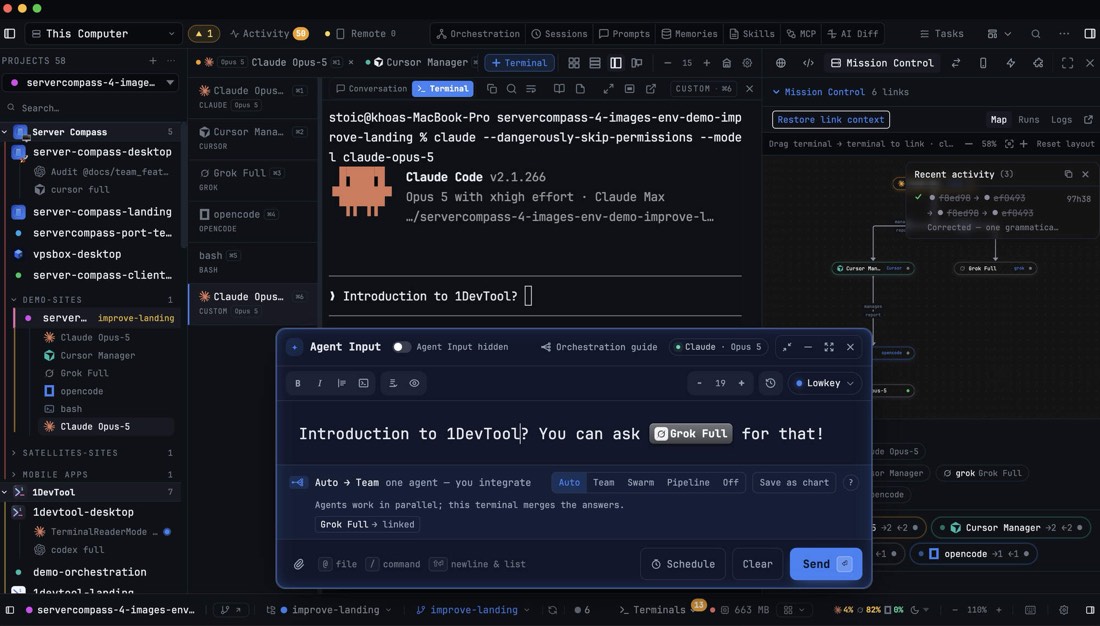
The 1DevTool workspace: a project file tree, an editor, terminals and an agent panel side by side in one window.

The workbench

1DevTool

Projects, terminals, code, Git, browsers, APIs and databases in one persistent desktop workspace. Point it at Claude, Codex, Gemini or a local model: the workspace is yours, the agent is whichever one you already pay for.

Agents. Routing, approval and session state for every coding agent you run, so a task survives being closed and reopened.

Hand-off exports a project as a deploy bundle that Server Compass imports.

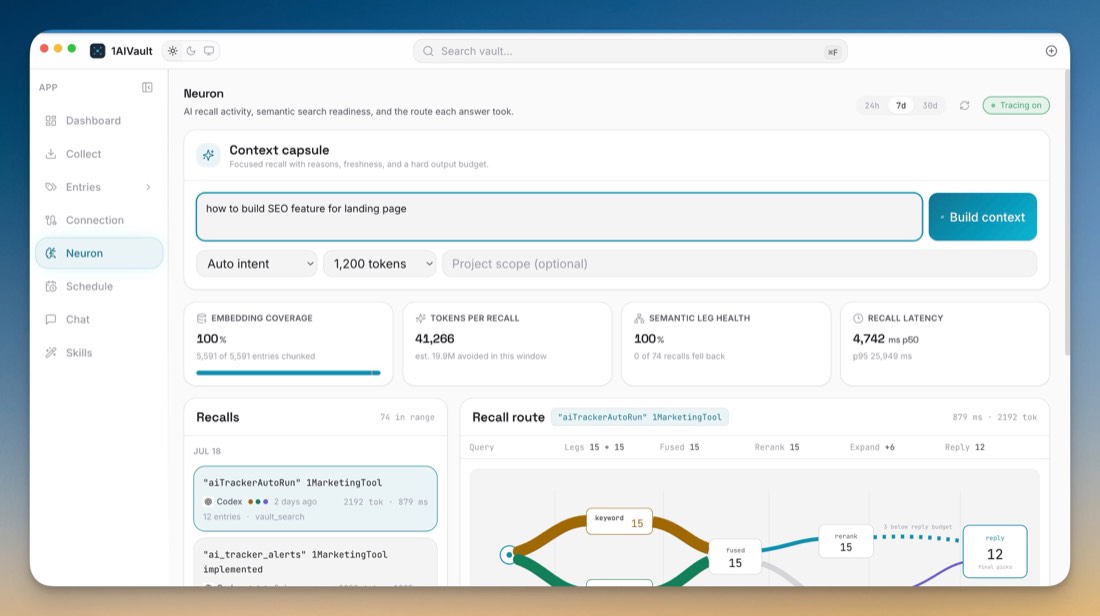
1AIVault building a context capsule: a question, the recall route it took through stored entries, and the coverage and latency of that recall.

The memory

1AIVault

Chat across models, then keep the part that mattered: decisions, preferences, topics and company knowledge, in a local vault.

Memory. Stored once, read by your agent over MCP (vault_search, vault_context) and listed in 1DevTool’s Memory panel.

Your agent, over MCP pulls the right entries in before it starts.

A product only reaches for a layer when it needs one. 1FileTool does not need agents to compress a PDF, and it does not load them.

One

Your agent calls each app’s tools over MCP.

Bring the agent you already pay for. Ten of the twelve apps ship an MCP server, so that one agent can work across your files, marketing, designs, videos, servers, browser and machine without you copy-pasting between apps. It all runs on your own computer.

Your AI agent

the one you already pay for

  • Claude Code
  • Codex
  • Gemini CLI
  • OpenCode
  • Cursor
  • a local model through 1LocalAITool
  • 1DevToolonedevtool
  • 1AIVaultoneaivault
  • 1LocalAITool1localaitool
  • 1FileToolonefiletool
  • 1MarketingToolonemarketingtool
  • 1DesignToolonedesigntool
  • 1VideoToolonevideotool
  • Server Compassservercompass
  • StoicBrowserstoicbrowser
  • 1MachineToolonemachinetool

Each app’s tools are listed in the reference below. The two free apps ship servers too, 1foundertool and vpsbox. Nothing passes through a StoicSoft server, because there isn’t one in the middle.

Two

Five places where one app hands work straight to another.

Each of these exists in code on both ends. Everything else between the apps goes through your agent, so if a link is not on this list, it is not there.

  1. 1AIVault

    Memory panel

    1DevTool lists every entry saved in your 1AIVault, next to the agents that need it.

    1DevTool
  2. 1DevTool

    Deploy bundle

    Export a project from 1DevTool; Server Compass imports it and puts it on your server.

    Server Compass
  3. 1DesignTool

    Send to 1VideoTool

    A finished design goes straight into a 1VideoTool production as footage to cut.

    1VideoTool
  4. 1LocalAITool

    Local model

    1MarketingTool can write with the model 1LocalAITool runs, so drafts never leave the machine.

    1MarketingTool
  5. 1MachineTool

    Command palette

    1MachineTool finds the StoicSoft MCP tools already set up in your AI clients and runs them from one hotkey.

    Every StoicSoft MCP tool you set up

Two relationships that are not hand-offs

The free apps sit beside two paid ones. No data passes between them; they are the same engine, or the rehearsal before the real thing.

  • 1FounderTool free 1DevTool

    Same engine. 1FounderTool is the 1DevTool engine without the terminal. Move to 1DevTool when you want the controls.

  • VPSBox free Server Compass

    Rehearsal. Practise a deploy on a local VPSBox server before you rent one, then run it for real with Server Compass.

Three

Two apps you run yourself, for now.

1AudioTool and 1ShowcaseTool have no MCP server today, and no other app reads from them. You open them, do the work, and carry the result to the next step yourself.

1AudioTool

Talk to your work instead of typing at it.

No MCP yet

Dictation, transcription and spoken digests, running on-device. It biases Whisper with your own dictionary and your project’s identifiers, then measures whether accuracy actually improved.

You take it on the transcript or the script you talked through, into whichever app needs it next. It does not feed the other apps.

1ShowcaseTool

Click through your app once and ship the walkthrough.

No MCP yet

Record a flow in the browser, a window or the whole screen. Review what was captured, redact anything sensitive, then export a step-by-step guide or a directed film.

You take it on the exported guide or film, to your launch page or your posts.

Six things a company has to do, and the app that picks up each.

Every product exists because one of these stages was being done by hand, badly, at eleven at night. Read down the column to see where one app’s work becomes the next one’s.

  1. Idea

    What am I actually making?

    You describe the thing you want to exist. 1FounderTool turns that into a plan you can argue with, and 1AIVault keeps the reasoning so you are not re-deciding it in three weeks.

    • 1FounderTool free
    • 1AIVault
    • Same engine Build picks up in 1DevTool when you want the terminal.
    • Hand-off vault entries appear in 1DevTool’s Memory panel.
  2. Build

    How does it get written?

    Agents work in 1DevTool across real projects and terminals, and 1AIVault keeps what they worked out.

    • 1DevTool
    • 1AIVault
    • Hand-off the deploy bundle goes on to Server Compass at Operate.
  3. Remember

    Where did that decision go?

    Every decision, preference and dead end lands in the vault. Six months later a new agent reads it through MCP instead of asking you to explain the project again.

    • 1AIVault
    • Your agent, over MCP reads it at every later stage with vault_context.
  4. Launch

    How do people find out?

    Research the keywords and write the launch post in 1MarketingTool. Record the product once in 1ShowcaseTool and get both the guide and the film. 1DesignTool has your coding agent make the deck and the brand kit as real files. 1FileTool handles whatever the app stores demand this month.

    • 1MarketingTool
    • 1ShowcaseTool
    • 1DesignTool
    • 1FileTool
    • Hand-off “Send to 1VideoTool” carries a design on to Communicate.
    • You, directly take 1ShowcaseTool’s guide or film where it is needed.
  5. Communicate

    How do I keep up with the talking?

    Dictate the reply on a walk, get the week read back to you, and cut one recording into the clips each channel wants.

    • 1AudioTool
    • 1VideoTool
    • You, directly carry 1AudioTool’s text on; it has no MCP server yet.
  6. Operate

    What keeps it running?

    Server Compass owns the servers and the deploys, and 1MachineTool keeps the computer you work on fast, cool and tidy. StoicBrowser keeps every product logged in and watched, and 1LocalAITool runs the models on the computer you already own.

    • Server Compass
    • 1MachineTool
    • StoicBrowser
    • 1LocalAITool
    • Hand-off 1LocalAITool’s model writes 1MarketingTool’s drafts back at Launch.
    • Hand-off 1MachineTool runs any StoicSoft MCP tool from one hotkey.

What “working together” means in one request.

Ask for something that crosses five apps and watch which one picks up each part. Your agent calls each app’s MCP tools on your own machine; nothing is uploaded between them.

“Turn this week’s release into a launch: screenshots, a compressed press kit, a post, and deploy the changelog.”
  1. Remember1AIVault

    The agent reads your launch voice and last week’s changelog entry first.

    vault_context
  2. Design1DesignTool

    The release screenshots are written to your disk as real files.

    design_generate
  3. Compress1FileTool

    The press kit is compressed on this machine.

    filetool_compress_images
  4. Draft1MarketingTool

    A launch post waits in 1MarketingTool for your review.

    content_write_piece
  5. DeployServer Compass

    The changelog is redeployed to your own server.

    redeploy_app

An illustrative run. The tool names are the apps’ real MCP tools. Watch it play on the homepage map.

What your agent can do in each app.

The MCP server each app ships and representative tools from it, checked against each shipping app. The tools listed are examples, not the complete set.

Each StoicSoft app, its MCP server and tools, and its hand-offs
AppMCP serverRepresentative toolsHand-offs
Build and think
1DevToolonedevtoolbrowser_navigate, query, request, tasks_create, orchestration_recommendTakes the Memory panel from 1AIVault. Hands a deploy bundle to Server Compass.
1AIVaultoneaivaultvault_search, vault_save, vault_context, vault_recent (34 tools)Listed in 1DevTool’s Memory panel.
1LocalAITool1localaitoolask_local, queue_job, machine_statusIts local model writes 1MarketingTool’s drafts. Serves OpenAI- and Anthropic-compatible endpoints on 127.0.0.1.
Create and grow
1FileToolonefiletoolfiletool_run, filetool_compress_pdf, filetool_to_markdown, filetool_pack_context (64 operations)None direct; your agent drives it.
1MarketingToolonemarketingtoolkeyword_explore, audit_run, content_write_piece, publish_schedule_contentWrites with 1LocalAITool’s local model.
1ShowcaseToolNo MCP server yet: you run it directly.None; you take the guide or film on.
1DesignToolonedesigntoolproject_create, design_generate, preview_screenshot“Send to 1VideoTool”.
1AudioToolNo MCP server yet: you run it directly.None; you take the text on.
1VideoToolonevideotoolvideo_create, production_list, run_decideTakes designs sent from 1DesignTool.
Operate
Server Compassservercompasslist_servers, deploy_template, get_app_logs, redeploy_appImports 1DevTool deploy bundles.
StoicBrowserstoicbrowserbrowser_goto, browser_extract, browser_screenshot, browser_list_workspacesNone direct; your agent drives it.
1MachineToolonemachinetoolmachine_status, diagnose, clean_scan, list_hogsIts command palette runs every StoicSoft MCP tool you set up, from one hotkey.
Free, outside the twelve
1FounderTool1foundertoolproject_init, decision_record, ship_readinessNone; the same engine as 1DevTool.
VPSBoxvpsboxcreate_sandbox, deploy_template, create_checkpointNone; rehearse here before Server Compass.

Four commitments shape every product.

These are constraints, not marketing. They rule out features people ask for, and they are the reason the apps look the way they do.

  • Local-first wherever it is technically possible

    Files, keyword data, recordings, vault entries and local models stay on your disk. When something genuinely has to leave, a model call you asked for or a deployment to your own server, the app says so before it happens.

  • You bring the AI

    Every app takes your Claude, OpenAI, Gemini or Kimi key, or points at a local model through 1LocalAITool. We do not resell tokens and we do not have a model of our own to push you towards.

  • Consequential actions wait for a human

    Agents can read widely and write freely inside a sandbox. Deleting, deploying, publishing and spending require you to say yes, and the app shows what it is about to do first.

  • The apps talk through your machine, not our servers

    Cooperation happens over MCP and the local filesystem. There is no StoicSoft account tying the products together, because there is no StoicSoft server in the middle to hold one.

The four things people ask first.

Do I need all twelve products?
No. Every product works alone and most people start with one. The shared layers are opportunistic: if 1AIVault is installed, 1DevTool lists your vault and your agent can search it over MCP; if it is not, everything carries on without it.
Does StoicSoft see my data or my prompts?
No. The apps run on your machine and call the AI provider you configured directly. There is no StoicSoft account and no server in the middle to log anything.
What does “bring your own AI” cost me?
Whatever your provider charges, billed by them, not us. You can also run local models through 1LocalAITool and pay nothing per token at the cost of slower answers.
How do the apps actually share memory?
1AIVault exposes a local MCP server. Your coding agent queries it for decisions, preferences and company knowledge instead of asking you to re-explain the project, and 1DevTool’s Memory panel lists every entry. Apart from that panel, the apps reach the vault through your agent.

Start with the two things everything sits on.

The AI Stack is 1DevTool and 1AIVault: the workbench and the memory. $39 once, against $58 bought separately. Add the rest when a stage of your work asks for it.

  • 1DevTool
  • 1AIVault

Not ready to pay? Start free with 1FounderTool, the 1DevTool engine without the terminal.