Write-Only Memory: Why Saved Context Needs Retrieval and a Review Loop
Saving is not remembering. A retrieval layer and a weekly review loop, not a bigger pile of saved links, is what turns a write-only vault into usable AI memory.
Saving is easy. Remembering is the hard part, and most of us only solve the first half. We highlight an article, screenshot a chat answer, star a thread, paste a useful prompt into a notes file, and feel a small sense of accomplishment. The information is captured. The problem is that capture and recall are different systems, and the gap between them is where most personal knowledge goes to die.
There is a name for this failure mode worth borrowing: write-only memory. You can put things in, but nothing reliably comes back out at the moment you need it. A vault with ten thousand entries you never reread is not a memory. It is a landfill with good search syntax. The week-old note you forgot you wrote is functionally identical to a note that never existed.
This post is about closing that loop. Not about saving more, but about building a retrieval layer and a review habit on top of what you already save, so that your captured context actually shows up in the work. Saving is necessary. It is just not sufficient.
The source signals for this post include thread 1, thread 2, and thread 3.
The note you wrote and forgot
Consider a familiar pattern. Someone keeps asking a chat assistant the same category of question over and over, gets a genuinely good answer, and dutifully copies it into a Markdown vault. The discipline is real. The file count grows. And a week later they are asking the assistant the same question again, because they have no memory that the earlier answer exists, let alone where it lives.
The instinct here is usually to blame organization. More folders, better tags, a stricter naming scheme. But the deeper diagnosis is that the vault is inert. It only responds to a query you already know how to phrase, against a structure you have to remember you built. The person in this situation eventually reached a sharper conclusion: the fix is not tidier storage, it is putting an AI layer directly on top of the local notes, so the vault itself can answer. Instead of recalling where you filed something, you ask, and the assistant grounds its response in your own captured material.
That reframing matters. The unit of value stops being the note and becomes the answer the note can produce on demand. Storage is the substrate. Retrieval is the product.
Thousands of saved threads, none of them working
The same dynamic scales up and gets worse when the inputs come from the web and social feeds. Picture someone who has saved thousands of items over years: Reddit threads that solved a specific problem, tweets with a sharp framing, Instagram posts bookmarked for a project, long comment chains worth keeping. Every one of those saves was rational at the time. Collectively they are write-only memory at industrial scale. The save button on every platform is a small lie of completion.
What changed the situation for this person was not deleting things or saving less. It was two additions. First, AI categorization passed over the backlog and gave it structure it never had at capture time: topics, themes, and connections inferred from content rather than from the folder the user happened to drop it in. Second, an MCP connection made that whole organized pile queryable from inside the assistant they already used. The saved context stopped being an archive they visited and became something the assistant could reach into mid-conversation.
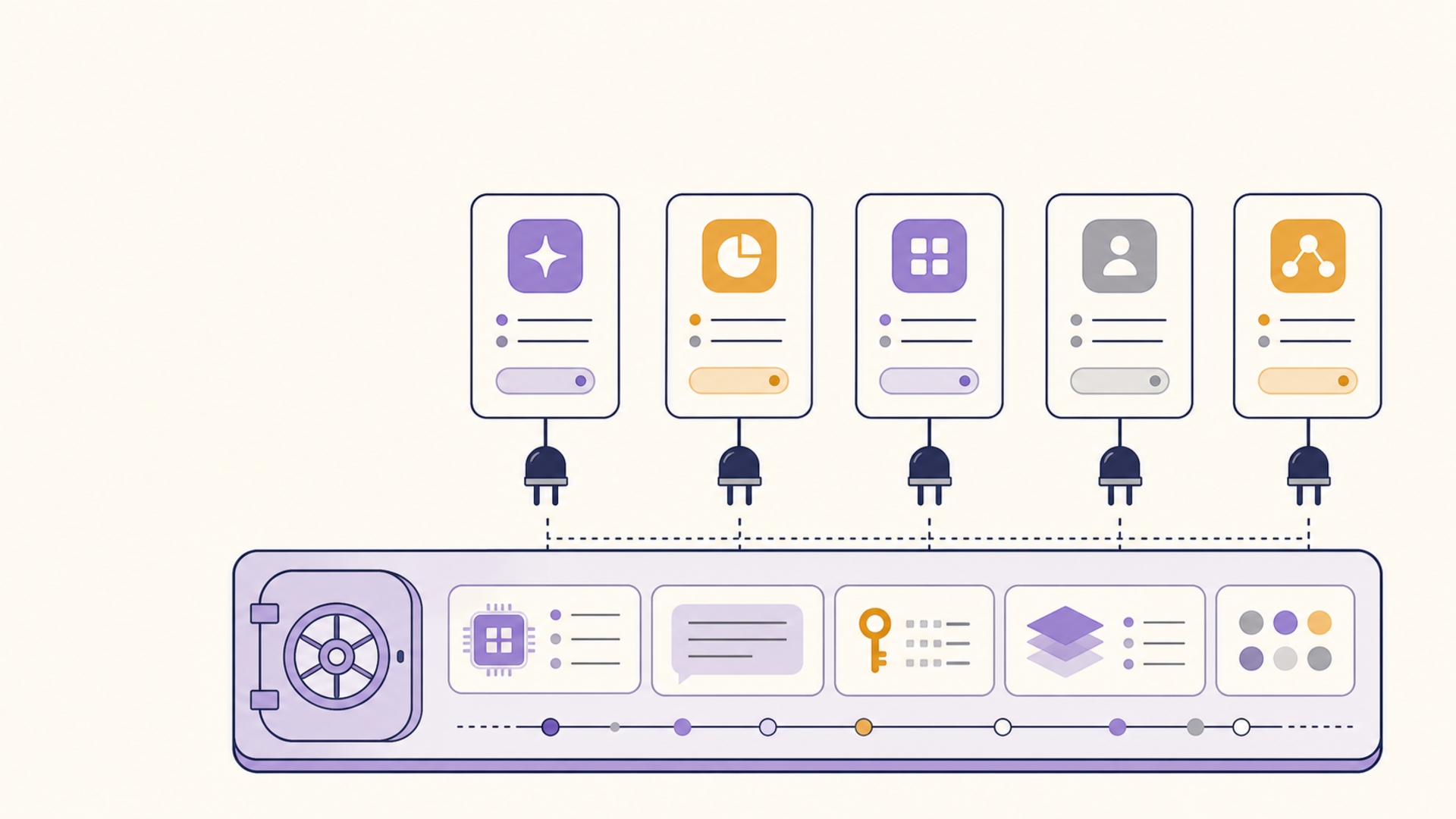
But even categorization plus retrieval was not the whole fix, and this is the part most people skip. The decisive ingredient was an explicit, recurring review step. A weekly pass over what came in, what got surfaced, and what is worth promoting or pruning. Without that loop, even a perfectly indexed vault drifts back toward write-only, because relevance decays and new captures bury old ones. The review is what keeps the retrieval layer pointed at things that still matter.
Why the review loop is the actual feature
It is tempting to treat the weekly review as housekeeping, the boring chore after the exciting capture. That has it backwards. The review is where memory is consolidated, the same way it works in a brain. During review you notice the three threads that are really about the same problem. You delete the twelve saves that felt urgent and turned out to be noise. You write the one sentence of synthesis that turns five raw sources into a usable conclusion.
A retrieval layer without a review loop degrades in a predictable way. The index grows, signal-to-noise falls, and queries start returning technically-relevant-but-useless results. You end up distrusting your own vault, which sends you right back to re-asking the cloud assistant from scratch. The loop is not optional polish. It is the maintenance that keeps retrieval honest. Capture feeds it, AI structures it, retrieval exposes it, and review prunes and promotes it. Drop any one stage and the system quietly reverts to a landfill.
Getting out of slow, lock-in storage
There is a parallel story on the storage side that reinforces the same lesson. Someone running a media tracker inside a hosted, cloud-first app hit the familiar walls: it was slow, it did not work offline, and the data lived in a proprietary shape they did not control. The move was to pull the whole thing into local-first Markdown in a plain folder, sync it across devices with a peer-to-peer file sync tool rather than a vendor cloud, generate the per-item metadata programmatically, and publish a static site as the readable output.
Notice what that migration buys, and what it does not. It buys speed, offline access, and durability. The files are plain text on a disk you own, syncable, scriptable, and exportable to a static site that survives whatever happens to any single app. What it does not automatically buy is recall. A fast, private, lock-in-free vault is the right foundation precisely because it is yours and it lasts, but it is still just storage until you put retrieval and review on top. Local-first solves ownership and longevity. It does not, by itself, solve write-only memory. The two layers are complementary: own the data, then make it answer.
Where 1AiVault Fits
1AiVault is built around the assumption that the loop, not the save, is the point. It is a private, local-first context vault, so the substrate stays on your machine and under your control rather than feeding personal notes to a cloud model. On top of that substrate it adds the parts that make memory more than storage.
For capture and import, it takes in notes, PDFs, saved web and social threads, chat exports, prompt libraries, and project context, so the scattered inputs from the scenarios above land in one place. For structure, it offers AI categorization over that material, including the backlog you accumulated before you had any system. For retrieval, it provides vault-grounded AI and MCP compatibility, so your own context is queryable inside the AI clients you already use, instead of sitting in a folder you forget to open. And because it is local-first with privacy-respecting exports, the vault survives tool churn the same way plain Markdown does. The review loop is yours to run; 1AiVault is what makes that weekly pass operate over a real, queryable corpus rather than a pile of dead files.
| Capability | Write-only vault | 1AiVault approach |
|---|---|---|
| Capture | Manual saves, no structure | Notes, PDFs, web/social, chat exports, prompts |
| Organization | Folders you must remember | AI categorization, including the backlog |
| Retrieval | Exact-match search only | Vault-grounded AI and MCP inside your clients |
| Review | None; index just grows | Recurring pass to prune and promote |
| Privacy and exit | Vendor format, cloud-bound | Local-first, portable exports, no lock-in |
The Takeaway
Reusable AI memory is not a longer chat history, and it is not a bigger pile of saved links. It is a system with stages: imports and saved web and social context flowing into local files you own, an AI retrieval layer that lets the vault answer instead of just store, a recurring review loop that keeps relevance from decaying, and privacy-respecting exports that outlive any single tool. The save button gives you the first stage for free and quietly convinces you the job is done. It is not. If nothing comes back out when you need it, you do not have a memory, you have write-only storage with extra steps. Build the loop, and the thousands of things you already saved finally start working for you.