The unified SSH-plus-AI workflow gap that nobody has shipped yet
Engineers debugging production hold three windows open: SSH, an AI assistant, and a notes file. They are the slow human bridge between tools that should be one. Why the unified product doesn't exist yet, and what to build today.
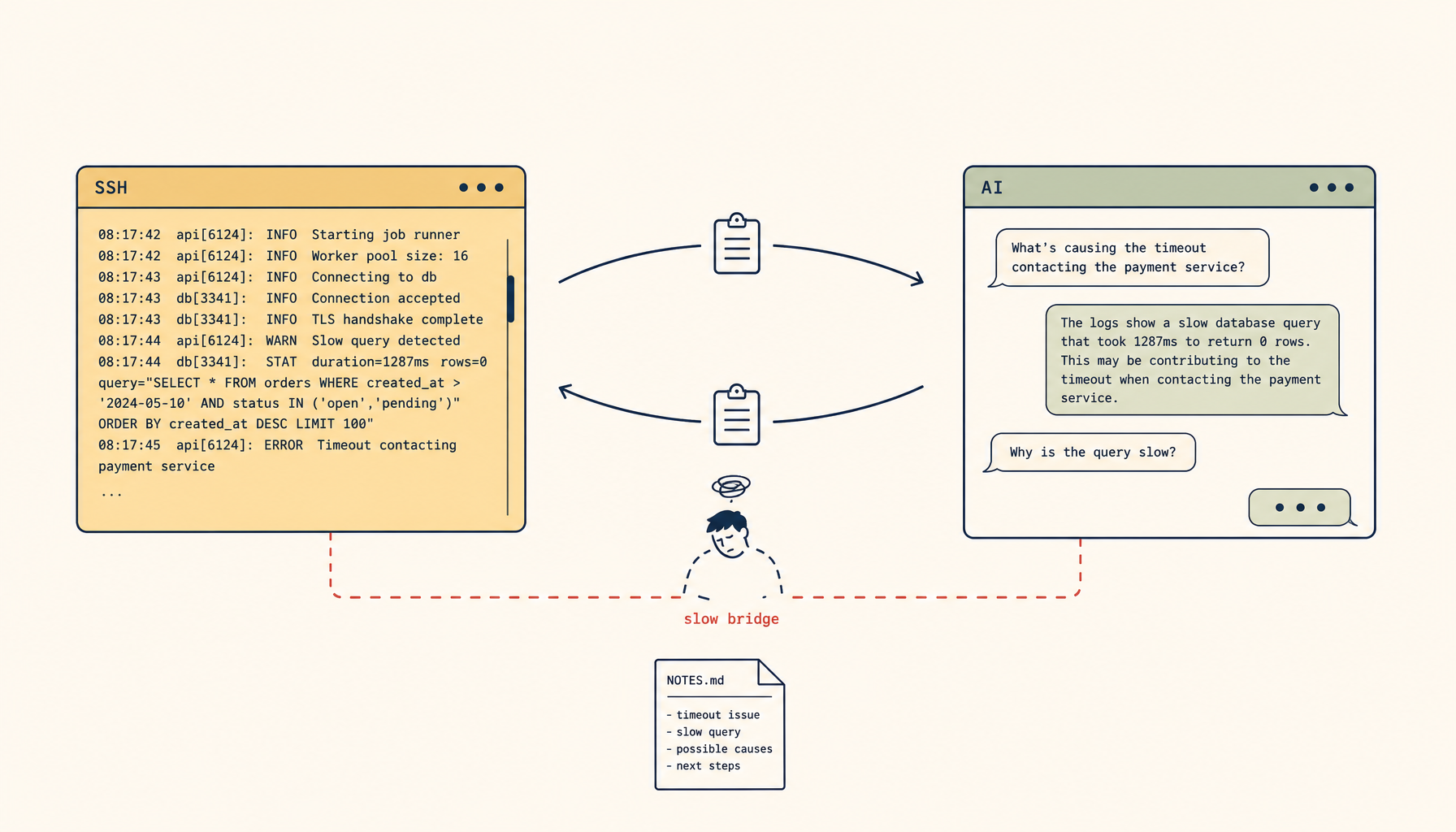
A senior engineer keeps three windows open while debugging a production incident: an SSH session into the production box, a Claude or Cursor window where she's pasting log excerpts and asking what they mean, and a notes file where she's tracking what she has tried. Every thirty seconds she copies something from the terminal, switches to the AI window, pastes it, reads the response, and switches back. After an hour, the notes file is incoherent, the AI's context is full of decontextualized paste fragments, and she still has not figured out what is wrong.
This workflow is now standard. It is also broken. The terminal and the AI assistant are doing different jobs at different latencies on different machines, with the engineer functioning as a slow human bridge between them. The bridge is the bottleneck. Every minute spent copy-pasting is a minute the AI is reasoning over partial evidence and the engineer is missing the next log line.
The market signal for "unified SSH plus AI workflow" is loud and growing because every team has hit this exact wall. The current crop of web-based terminal tools, AI IDEs, and SSH clients each do part of the job. None of them do the whole thing well. The fragmentation is the topic of this piece.
What "the whole thing" actually means
A useful unified SSH + AI workflow does five things, in this order:
- A real SSH connection to the actual production box, not a sandbox or a managed shell.
- A scrolling log of every command and its output, captured locally and inspectable by the AI without a paste step.
- An AI assistant that can read that log when answering, without needing the engineer to feed it manually.
- The ability for the AI to suggest commands, with the engineer approving each one before it runs (not blanket auto-execute).
- Persistence across reconnects so a laptop closing for ten minutes doesn't destroy the session and its associated AI context.
Almost nobody does all five. The interesting question is which of the existing tool categories fail at which steps.
The four kinds of tool, and where each one breaks
The SSH client (iTerm2, kitty, Alacritty, Terminal.app, Windows Terminal). Solid on step 1. Has nothing for steps 2–5. The engineer is the bridge. This is the dominant workflow today and the most expensive one in time.
The AI IDE (Cursor, Claude Code, Codex, Continue.dev). Solid on step 3, partial on step 4. Step 1 is hit-or-miss — most AI IDEs treat the local terminal as a Bash subprocess, not a real SSH session into a remote box, so connecting to production requires layers of ssh -t ... bash indirection that lose interactive features. Step 2 happens inside the IDE's terminal, but the AI's awareness of that terminal's history is shallow and fades. Step 5 is fragile because the IDE owns the lifecycle, not the engineer.
The browser-based terminal (gotty, ttyd, web-based shells). Solid on step 1 if configured. Step 2 is good — the browser session is a long-lived stateful thing. Steps 3 and 4 require a separate window and another paste cycle, just routed through a browser instead of a desktop app. Step 5 depends on whether the underlying tmux/screen session persists.
The cloud-managed dev environment (Codespaces, JetBrains Gateway, Tabby). Strong on steps 2 and 5. Weak on step 1 — the "connection" is to their managed environment, not to your production box, and bridging back to production happens through the same SSH-from-a-cloud-VM dance with all the same costs. AI integration varies; some have real assistants embedded, some do not.
The pattern is consistent. Each tool category solves a different two or three of the five steps. None solves all five. The engineer's daily workflow is held together by friction.
Why this gap exists right now
Three structural reasons.
SSH is forty years old; AI assistants are two. The protocols, terminal emulators, and tmux/screen patterns predate AI by decades. Bolting an AI layer onto SSH means writing software that mediates a stream protocol designed before anyone considered it should be mediated. Most tools opt out of mediation and just open a passthrough terminal, which is why the AI-integration story stays shallow.
The interesting AI integration requires the AI to read terminal output passively, not on-demand. Step 3 — "the AI reads the log" — is the hard one. It implies the tool watches every command's output, summarizes it, and keeps it ready for the next AI question. That is a non-trivial product to build and a non-trivial UX to expose without burying users in noise. Most tools default to "AI runs when you ask" rather than "AI watches alongside you."
The trust model for step 4 is unsolved. Letting an AI suggest commands is fine. Letting it execute them on a production box is dangerous. The middle ground — the AI proposes, the engineer one-click approves — is the right shape, but it needs explicit per-command approval flows that are uncommon in current tools. Most AI IDEs default to "execute," which the engineer turns off, which collapses to "suggest only," which is no better than copy-pasting the suggestion into the terminal manually.
These are solvable problems. They are not solved yet by any single tool, which is why the workflow is fragmented.
What a real unified workflow looks like
Sketch the workflow that would make the engineer in the opening anecdote dramatically more productive. The pieces:
- A persistent terminal pane connected via SSH to the production box. Real SSH, not a managed proxy. The pane survives laptop lid closes and network drops because it's anchored to a server-side
tmuxor equivalent. - A side pane showing the AI assistant. The assistant has a live, read-only feed of the last several commands and their outputs from the terminal. No paste required.
- An "ask" affordance that sends the engineer's question to the AI with the recent terminal context already attached. Default scope is the last 50 lines or the last command's output, with an explicit "include more" option.
- A "propose command" affordance where the AI can write a command into a staged buffer in the terminal, but does not execute it. The engineer presses Enter to run, or edits, or rejects.
- A session log that is durable across reconnects. The engineer's notes file becomes redundant because the conversation log is the notes file.
This is not a research project. Every component exists in some form today. What is missing is one tool that combines them with the right defaults and the right trust model for production use.
Where the existing tools land on each criterion
Honest scoring of the four categories on the five criteria:
| SSH client | AI IDE | Browser term | Cloud dev env | |
|---|---|---|---|---|
| 1. Real SSH to prod | yes | partial | yes | partial |
| 2. Local log of commands | no | partial | partial | yes |
| 3. AI reads the log passively | no | partial | no | partial |
| 4. AI proposes, engineer approves | no | partial | no | partial |
| 5. Persistent across reconnects | no | no | partial | yes |
No category gets all five. The closest is "AI IDE plus a remote-tmux setup, plus discipline" — but that is three tools held together with shell aliases, and discipline is not a feature.
What you can build today, before the unified tool exists
The workflow above is achievable with current tools, at the cost of setup time and some daily friction. A working stitched-together version:
- Connect via SSH to the production box, immediately attach a
tmux new -s prodsession. Configure your terminal to auto-reattach on reconnect. - Start a local script that
tail -fs the tmux pane's content (tmux capture-pane -p -S -200) into a file the AI tool can read. Run this in a sidecar window. - Use Claude Code or a similar agent locally, pointed at that capture file as context. Ask questions; the agent reads recent terminal output before answering.
- For "AI proposes, you run" — paste the proposed command, edit if needed, run. This is the manual step the unified tool would automate.
- For session continuity, the tmux session on the production box survives laptop closes; the local sidecar reattaches when you reconnect.
This is not pretty. It works well enough that engineers running incidents twice a month find it worth the setup. It is also exactly the kind of workflow that gets eaten by the first product that ships steps 2–4 cleanly.
Why this matters for product builders
The fragmentation is a product opportunity. The market signal — engineers swearing at their copy-paste workflow during incidents — is loud, repeated, and crosses every team that has both a production system and AI assistants in their daily flow.
The product that wins is not "AI for SSH" as a feature bolted onto an SSH client. It is a workflow tool that takes the five criteria above as table stakes, makes step 4's trust model explicit and adjustable, and treats the session log as a first-class artifact that the engineer can rerun, share, and search. It is closer to a debugging notebook than to a terminal.
The teams currently solving this problem with three tools and a discipline are the early adopters of whichever product gets there first. The size of that market is roughly "every senior engineer." The fragmentation will not last.
Until then, the workflow is the workflow. The engineer keeps three windows open. The AI runs on partial evidence. The notes file is incoherent. And every team's senior engineers are spending an hour a week copy-pasting between tools, because the unified workflow they need does not exist as a product yet.
The deeper observation, which earns being said plainly: the bottleneck in modern engineering work is rarely the tool that does the task. It is the bridge between the tools that do adjacent tasks. Whoever shortens that bridge wins.
Related in the StoicSoft network
If you work in AI-assisted coding, shared terminal sessions, or agent-driven shell workflows like the ones above, 1devtool is the StoicSoft network's tool for safer AI-assisted terminal work — shared sessions with auditing, preflight policy, and tiered model routing built in.