Tmux session discoverability: the onboarding wall the keybinding tutorials skip
New engineers don't trip over tmux keybindings — they trip over which session to attach to. A naming convention, an honest listing wrapper, and a read-only-first attach rule turn tmux from a maze into a collaboration substrate.
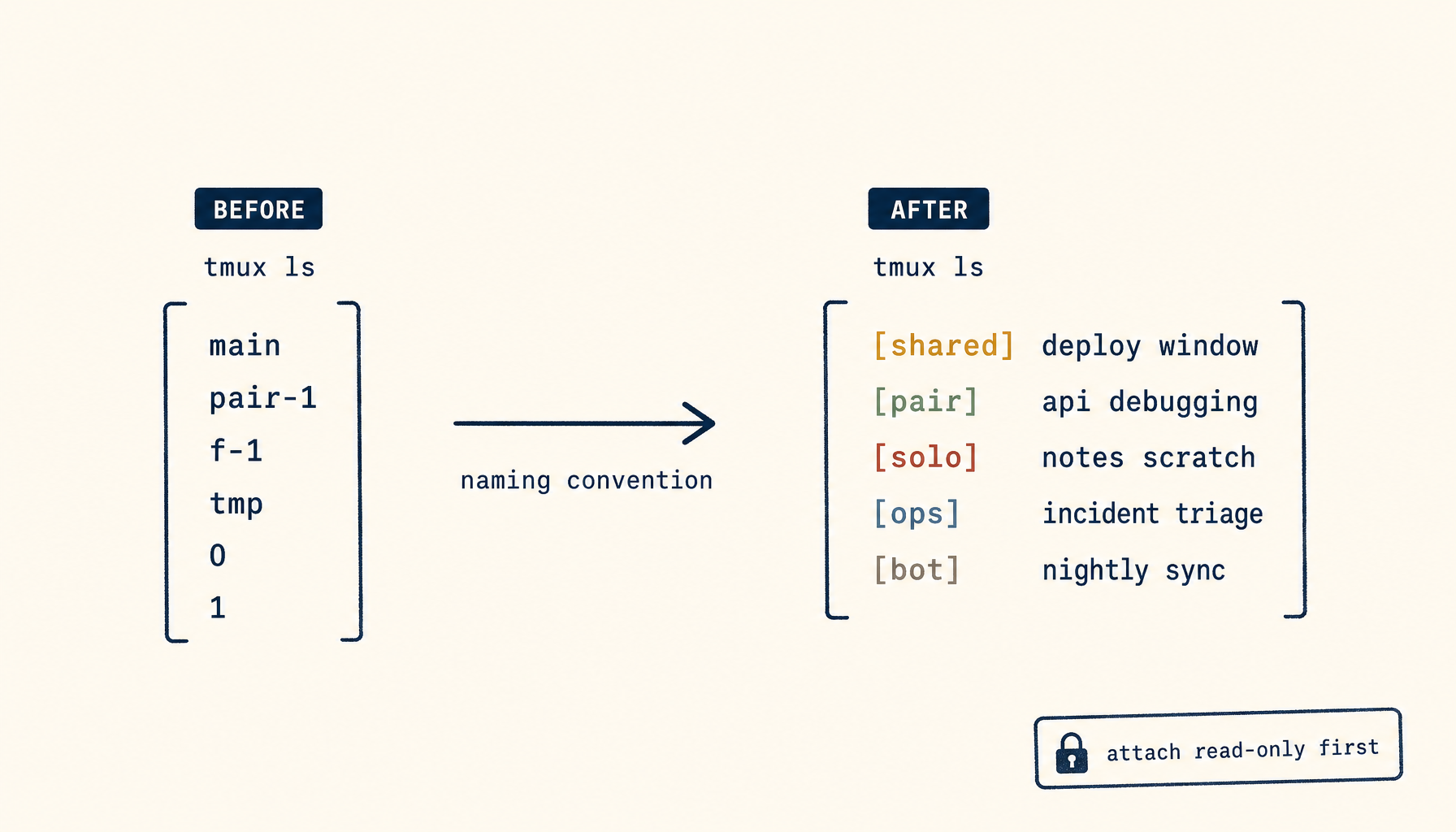
A new engineer joins a small team on a Monday. The team's standard development setup uses tmux on a shared bastion host — there's a "main" session for pairing on the production database, a "deploy" session pinned to one engineer who runs releases, and a fluid set of per-feature sessions that come and go. The new engineer is told, on her first day, "just attach to the right session." She types tmux ls. Nine sessions show up, named main, pair-1, pair-2, dl, tmp, f-billing-rewrite, bot, 0, and 1. None of the names tell her which one she's allowed to attach to, which one is currently active, who created which, or what's running inside.
She picks main, which turns out to be a senior engineer's personal scratch session that she absolutely should not be in. She backs out. She tries pair-1, which is empty and has been for three weeks. She gives up and asks in the team chat. Twenty minutes of her morning have gone to a problem nobody on the team thinks of as a problem, because they all have the discoverability map in their heads.
This is the part of tmux collaboration that the keybinding tutorials skip. The keybindings are easy to learn. The session model — what's there, who owns it, what it's for, when to attach, when not to — is the wall every new team member hits. It's also the wall that costs the most for the most people, because it shows up on every onboarding, every cross-team handoff, every incident where someone needs to pair quickly with a stranger.
This piece is about that wall. The keybindings get a paragraph at the end. The interesting question is what tmux sessions need around them to be a collaboration substrate instead of a maze.
What "discoverability" actually means here
Discoverability in tmux collaboration breaks into four sub-problems, each of which deserves a name.
Inventory. What sessions exist right now, what are they for, who owns each one. The thing tmux ls half-answers and that nobody puts effort into making fully-answered.
Permission. Of the sessions that exist, which ones may a given engineer attach to? Some are personal. Some are shared. Some are off-limits for review reasons (a session pinned to live debugging during an incident, where adding viewers changes the cognitive load).
State. Of the sessions you may attach to, which ones are active (someone's typing) versus idle (a long-running process, attached but unused) versus abandoned (no humans for two weeks, nobody quite remembers why it's there).
Onboarding. How a new engineer learns the above without typing tmux ls and panicking. This is the meta-problem; the previous three are the components.
A team that has solved all four can pair, hand off, and onboard in minutes. A team that has solved none of them — which is most teams — burns an hour every time someone new touches the bastion.
The naming convention is load-bearing
The single highest-leverage move is a strict session naming convention. The convention takes ten minutes to define and survives forever. The lack of one is the source of half of the discoverability pain.
A working convention:
{type}-{owner}-{purpose}

Where {type} is one of:
  shared   — anyone may attach
  pair     — two-person, attach with permission
  solo     — owned by one engineer, do not attach
  ops      — operational session (deploys, migrations)
  bot      — automated process, do not attach
Example sessions under this convention:
shared-team-main           <- the main shared work area
ops-alex-deploy            <- alex's deploy session, do not attach
pair-mira-billing          <- mira is pairing on billing
solo-dan-scratch           <- dan's personal session
bot-monitoring             <- automated monitoring, do not attach
Reading tmux ls now answers three of the four sub-problems at a glance: inventory, permission, ownership. State and onboarding need additional structure, but the naming alone gets you most of the way.
A renaming pass on existing sessions takes thirty minutes. The discipline of using the convention for new sessions takes five seconds per session. Add a tiny helper that prepends the prefix automatically:
# ~/.bashrc on the bastion
ts()    { tmux new -s "shared-team-${1?missing-purpose}"; }
tpair() { tmux new -s "pair-$(whoami)-${1?missing-purpose}"; }
tsolo() { tmux new -s "solo-$(whoami)-${1:-scratch}"; }
tops()  { tmux new -s "ops-$(whoami)-${1?missing-purpose}"; }
Now the convention is the path of least resistance. New engineers create sessions correctly because the wrappers do it for them.
Making tmux ls actually informative
The default tmux ls output is one line per session: the name, the window count, the dimensions, and whether anyone's attached. That's enough for an experienced user. It is wildly insufficient for an onboarding moment.
A small wrapper that augments the output dramatically improves the day-one experience. The shape:
$ tls
NAME                       OWNER  TYPE     ATTACHED  IDLE   PURPOSE
shared-team-main           team   shared   alex,mira  2m    main work area
ops-alex-deploy            alex   ops      alex       0s    deploy v1.42
pair-mira-billing          mira   pair     mira       8m    pairing welcome
solo-dan-scratch           dan    solo     -          3h    do not attach
bot-monitoring             bot    bot      -          0s    metrics scraper

(5 sessions, 3 attachable to you)
The "attachable to you" line is the load-bearing one for new engineers. It encodes the permission rule directly into the listing: solo and bot sessions filtered out, pair sessions filtered out unless the new engineer is the named pair, shared and (with caveats) ops sessions in scope.
Implementation is a 30-line shell script over tmux ls -F "#{session_name} #{session_attached} #{session_activity}", parsed and prefixed with the type, plus a static purposes.txt file in the team's repo that maps session names to purpose strings. The purposes.txt file is the team's living documentation of what each long-lived session is for. New engineers read it once and learn the topology.
The state problem: what's idle, what's abandoned
Sessions accumulate. A session named pair-mira-billing from three weeks ago is no longer a pairing session — Mira and her partner moved on, but the session is still there, possibly running a long-dead process, possibly holding a DB connection, definitely confusing the next engineer who reads it.
Two practices kill this:
A weekly grim reaper. A scheduled job (or a Friday-afternoon Slack reminder) lists sessions idle for more than seven days and asks the owner to either kill them or rename them with a keep- prefix. Sessions with a keep- prefix never get auto-killed. Everything else, after fourteen days of idleness, is killed automatically.
Auto-detach from abandoned sessions. A small cron job that runs tmux detach -s <session> for any session whose only attached client has had no input for over an hour. The session stays alive (the long-running process inside continues), but no zombie clients are listed as attached, so the listing accurately reflects who is actually present.
These two practices reduce the noise in tmux ls from "everything that has ever existed" to "the things that are actively in use." Combined with the naming convention, they make the inventory honest.
The onboarding doc that actually gets read
Most teams have a wiki page about tmux. New engineers do not read it on day one because it is the seventeenth wiki page they have been pointed at and the content is the keybinding tutorial they could find on Google.
A doc that gets read has three sections, in this order:
- The team's session topology — a short list of the standing shared sessions and what each is for. Rendered live from the same
purposes.txtfile the listing wrapper uses, so it can never go stale. - The naming convention — three sentences and the prefix table. Not the rationale; just the rule.
- How to attach, and how to not stomp on someone —
tmux a -t shared-team-mainto attach read-only withtmux a -r. The phrase "always attach read-only first if you don't know who's there" goes here.
Keybindings come last, and ideally come from a one-page cheat-sheet generated from the team's actual ~/.tmux.conf, not a stock tutorial.
The total length is under 300 words. The new engineer reads it in three minutes. Compare with a standard "here is everything about tmux" wiki, which the new engineer skims for ten minutes and learns nothing useful for their actual day.
The "attach read-only first" rule
A small rule with outsized impact: when in doubt, attach with -r (read-only) before going read-write. Every modern team that pairs on tmux should adopt this and almost none do.
The mechanic: tmux a -r -t <session> joins the session in read-only mode. The new engineer can see what's on screen, what command is running, what the other engineer is doing. They cannot type. They cannot accidentally interrupt a long-running process by sending keystrokes that get interpreted as input.
Once they have orientation — they can see whose session it is, what's running, whether it's busy — they detach (read-only), check in over chat ("hey, can I jump into shared-team-main with you?"), and reattach read-write only after the existing engineer says yes.
This pattern eliminates the most common tmux collaboration injury: the new engineer attaches to a session where someone is in the middle of a vim edit or a psql shell, presses some keys, and disrupts a delicate state. The read-only intermediate step makes the intrusion impossible by construction.
Make tar (tmux attach read-only) the alias, and make it the first thing in the onboarding doc. New engineers should reach for tar before ta for their first month.
Keybindings, briefly
The keybindings teams trip over are not "how do I split a pane." They're the team-customs ones: which prefix key is in use (C-b default vs C-a common rebind), what the window-renaming binding is, how to broadcast the same input to multiple panes for setup commands. Document these specifically in the onboarding doc, with three-line examples. Don't document anything else about keybindings — the man page is a fine fallback, and the team's .tmux.conf is the source of truth.
The discoverability story above is upstream of every keybinding question. A new engineer who can't figure out which session to be in does not benefit from learning prefix-arrow to switch panes. Solve the topology first; the keybindings are a footnote.
What this changes about how the team operates
The transformation, when a team adopts the convention plus the listing wrapper plus the read-only attach rule, is not glamorous. The team's tmux usage looks the same from a screenshot. But onboarding shifts from "an hour of trial-and-error and asking in chat" to "three minutes of doc plus tls." Pairing shifts from "guess if it's safe to type" to "attach read-only, ask, escalate." Cleanup happens on its own because the grim reaper enforces it.
Most teams that adopt this never write up the change because it doesn't feel like an event. It is, in fact, the cheapest workflow upgrade you will make this quarter, and the one with the highest payoff in time-to-productive for every new engineer the rest of the year.
The deeper rule, which generalizes beyond tmux: a collaboration tool is only as effective as its discoverability story. The keystrokes are the easy part. The map of who's where, what's running, and where it's safe to go is the part teams skip and pay for. Spend an afternoon on the map; spend an hour total on the keystrokes.
Related in the StoicSoft network
If you work in AI-assisted coding, shared terminal sessions, or agent-driven shell workflows like the ones above, 1devtool is the StoicSoft network's tool for safer AI-assisted terminal work — shared sessions with auditing, preflight policy, and tiered model routing built in.