Secure browser terminal sharing: what gotty does not give you
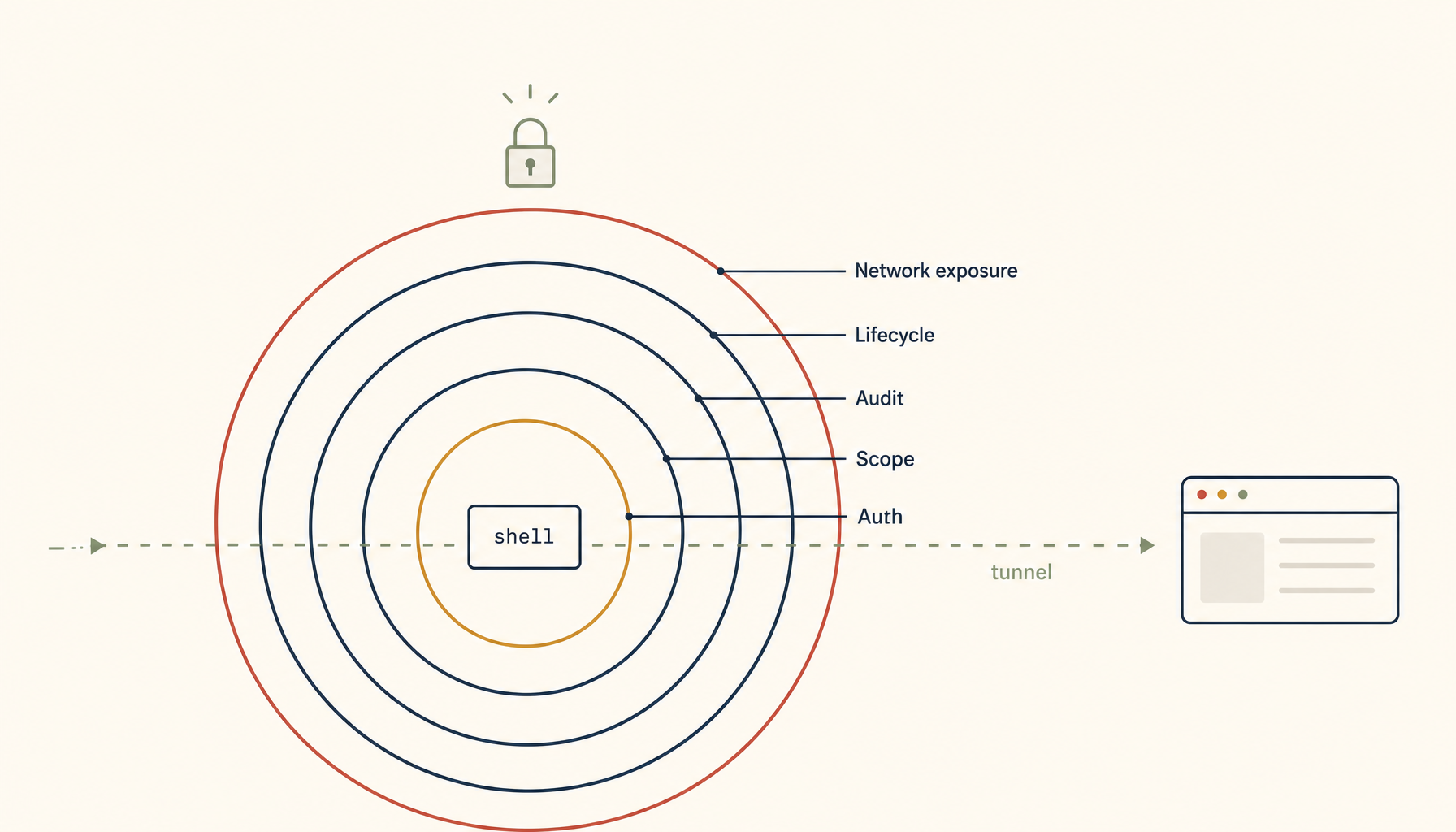
Default gotty publishes a writable shell at a public URL with no auth, no audit, no expiry. Five concerns — auth, scope, audit, lifecycle, exposure — and a 50-line wrapper that closes the gap without replacing the tool.
A backend team needs an oncall engineer to share their terminal with a database expert from a partner team during a 2 AM incident. The default tool everyone reaches for is gotty — start it on the bastion with gotty -w bash, share the URL, the partner pastes it into their browser, both engineers see the same shell. Twenty seconds of setup. Done.
What is also done, and unmentioned in any gotty quickstart: a publicly-accessible URL has just been published with a writable shell on a production-adjacent box. The URL has no auth. The session has no audit log. The shell runs with whatever permissions the bastion user has, which on most teams is "more than enough to do real damage." The URL is now in the partner's browser history, in the laptop's clipboard manager, and — depending on the partner's tools — possibly in a synced document somewhere.
The incident is resolved. The URL is forgotten. The gotty process is still running. The next morning, a Shodan scan picks up an open WebSocket on a high port serving a writable bash shell, and a security researcher emails the team's security@ address asking polite questions.
This is not a hypothetical. Versions of this story are filed regularly to disclosure programs, and the answer is rarely "gotty had a CVE." It's "gotty's defaults are not production-safe and the team used the defaults." The fix is not to abandon gotty. It is to put the right scaffolding around it — auth, scope, audit, lifecycle — and treat browser terminal sharing as a security-sensitive operation rather than a convenience tool.
This piece is the scaffolding.
What "secure" actually requires
Five concerns, all of which the default gotty setup gets wrong out of the box. Understanding the list is more important than the specific tool you choose to fix it.
1. Authentication. Who can attach to the session? The default — anyone with the URL — is wrong for any production-adjacent use.
2. Authorization scope. What can the attached user do? gotty -w bash gives full shell. The right scope for most sharing is much narrower: read-only viewing of an existing session, or a single command, or a restricted subshell.
3. Audit log. What happened during the session? Who connected, when, what did they type, what did they see. Without this, post-incident review is "two people remember what they did" and no auditor will accept it.
4. Lifecycle and lifetime. When does the session end? The default — when somebody manually kills the gotty process — is wrong because nobody manually kills the gotty process. The session must terminate on its own, ideally aggressively.
5. Network exposure. Where is the session reachable from? A public URL is the most common default and almost never the right choice. Most sharing should be reachable only from inside the team's network or via a tunnel.
A working secure-sharing setup hits all five. Anything that hits four of five is a vulnerability waiting to be found.
The four scenarios — and what each one needs
Different sharing situations need different scaffolding. Lump them all into one tool and you over-secure routine cases or under-secure dangerous ones.
Scenario A: read-only over-the-shoulder during pairing
A senior engineer is debugging; a more-junior engineer wants to watch and learn. No need to type. No need to take over. Just see the screen.
The right primitive: tmux attach -r on the same machine, after the junior engineer SSHes in. No browser, no public URL, no extra tool. The pairing happens inside the existing SSH layer with the existing user accounts.
If both engineers cannot reach the bastion directly (junior is offsite without VPN), use a Tailscale or WireGuard tunnel to give the junior engineer a route to the bastion. They SSH in normally and attach read-only. The session is invisible to anyone outside the tunnel.
This is the most common case, and it should never involve gotty.
Scenario B: temporary external partner shadowing during an incident
The 2 AM database expert. Cannot be added to the team's identity provider. Cannot be put on the VPN in the next twenty minutes. Needs to see what's happening on the bastion right now.
The right primitive: a time-limited, password-protected, read-only browser terminal, reachable via a tunnel exposed only to the partner's specific public IP, with a session log that captures every byte.
A working configuration:
# Generate a random session credential
SESS_USER="incident-$(date +%s)"
SESS_PASS="$(openssl rand -hex 16)"

# Start gotty in read-only mode with auth, on localhost only
gotty \
  --address 127.0.0.1 \
  --port 8421 \
  --credential "$SESS_USER:$SESS_PASS" \
  --permit-write=false \
  --max-connection 1 \
  --timeout 1800 \
  -- tmux attach -r -t shared-incident &

GOTTY_PID=$!

# Expose only via a Cloudflare or ngrok tunnel restricted to the partner's IP
# (or open a temporary firewall rule for that single IP, port 8421)

# Auto-kill after 30 minutes
( sleep 1800 && kill $GOTTY_PID 2>/dev/null ) &
Five things this configuration gets right:
--address 127.0.0.1keeps gotty off the public network — the tunnel is the only exposure.--credentialrequires HTTP basic auth before the WebSocket connects.--permit-write=falsemakes the session read-only; the partner cannot type.--max-connection 1allows only one viewer.--timeout 1800ends the session after 30 minutes regardless.
Plus the auto-kill at the script level as belt-and-braces in case --timeout misbehaves on the build of gotty in use.
The partner gets the URL, the credential, attaches in their browser, watches the work, disconnects when done. Worst case at the end of the incident: the script's auto-kill fires; the gotty process is gone; nobody remembers to clean up because there's nothing to clean up.
Scenario C: handing off to a teammate who needs to take over
The engineer's laptop is dying, or it's 6 AM and they need to pass an active incident to somebody fresh. The other person needs to take over the same shell.
The right primitive: tmux session passing, not browser sharing. Both engineers SSH into the bastion under their own accounts, the receiving engineer attaches to the same tmux session, the original engineer detaches. Two SSH connections, one tmux session, full audit because each engineer's keystrokes appear in their respective shell history and the shared command-logging hook (described below) captures both.
If both engineers must use the same OS user (a common but bad pattern), use a sudo-logged shared user with script enabled to capture every keystroke. Even better: fix the bad pattern by giving each engineer their own bastion account with sudo to a shared role.
Scenario D: AI-assisted view-along
The newest scenario, the one driving most of the recent demand. An AI assistant on someone's laptop watches a remote terminal session for context, summarizes errors, and proposes commands. The engineer evaluates and runs.
The right primitive is not a public web terminal. It is a local transcript file the AI can read, fed by a tmux capture-pane hook on the bastion side, ferried over SSH. The AI never has direct access to the terminal; it has access to the log of the terminal. Proposed commands flow in the opposite direction, from the AI to a staged buffer the engineer must approve.
The security boundary here is the same as scenario A: SSH and existing user identity. The AI on the laptop is, from the bastion's perspective, a process running as the engineer. It has whatever permissions the engineer has, no more.
What gotty alone does not give you, ever
Three properties matter for production use that gotty does not provide regardless of flags:
Identity-bound auth. Gotty's --credential is one-shared-password. Real auth — "this person, with this device, with this MFA factor" — is not in scope for gotty. For anything beyond a one-time external partner, put gotty behind an auth-aware proxy (oauth2-proxy, Cloudflare Access, or similar) that handles the identity layer and forwards only the WebSocket if the request is authenticated.
Per-keystroke audit. Gotty produces no transcript by default. Wrap the inner command in script -f /var/log/sessions/$(date +%s)-$(whoami).log so every byte of the session lands in a tamper-evident log file. Ship that log file off-box on close so even a rm on the bastion does not destroy the audit.
Active termination on idle. Gotty's timeouts are about session duration, not idle time. A user who attaches and walks away holds the session for the full 30 minutes by default. Wrap the inner shell with a script that exits if no input or output for, say, 5 minutes. The session ends as soon as nobody is actively using it.
These three are the gap between "gotty works" and "gotty is safe." The gap is bridged by wrapping gotty, not by replacing it. The replacement tools (e.g. enterprise terminal-sharing products) all exist; they all do these wrappings for you. For a small team running on its own infrastructure, doing the wrapping yourself in 40 lines of shell is faster than evaluating products.
A network-exposure rule worth memorizing
The single biggest gotty mistake is --address 0.0.0.0 plus a port forwarded by the cloud provider's firewall. That makes the URL public.
The rule: gotty binds to 127.0.0.1 (or a tailnet/VPN-only address). Public reachability comes from a separate, auth-aware tunnel — Cloudflare Access tunnel, Tailscale Funnel with ACLs, an SSH -L forward, or a temporary nginx vhost behind oauth2-proxy. The tunnel is the access-control layer; gotty is just the terminal layer.
This separation is the single most important architectural point in the whole topic. Gotty is not, and was never designed to be, an internet-facing tool. Putting auth in front of it via a separate layer is the correct deployment pattern.
A 50-line wrapper that gets all five right
Treat the following as a starter, not as production code:
#!/usr/bin/env bash
set -euo pipefail

SESS_NAME="${1:?usage: secure-share <tmux-session-name> [readonly|readwrite] [minutes]}"
MODE="${2:-readonly}"
DURATION_MIN="${3:-15}"

[[ "$MODE" =~ ^(readonly|readwrite)$ ]] || { echo "MODE must be readonly|readwrite"; exit 1; }
WRITE_FLAG="--permit-write=false"
[[ "$MODE" == "readwrite" ]] && WRITE_FLAG="--permit-write=true"

PASS=$(openssl rand -hex 12)
USER="share-$(date +%s)"
PORT=$(shuf -i 8400-8499 -n 1)
LOG="/var/log/sessions/$(date -u +%Y%m%dT%H%M%SZ)-${USER}.log"

mkdir -p /var/log/sessions

ATTACH_CMD="tmux attach -t $SESS_NAME"
[[ "$MODE" == "readonly" ]] && ATTACH_CMD="tmux attach -r -t $SESS_NAME"

gotty \
  --address 127.0.0.1 \
  --port "$PORT" \
  --credential "$USER:$PASS" \
  $WRITE_FLAG \
  --max-connection 1 \
  --timeout $((DURATION_MIN * 60)) \
  -- script -f -q "$LOG" -c "$ATTACH_CMD" &

GPID=$!
( sleep $((DURATION_MIN * 60 + 30)); kill $GPID 2>/dev/null; rclone copy "$LOG" hetzner:session-logs/ ) &

echo "share at: http://127.0.0.1:$PORT"
echo "creds:    $USER / $PASS"
echo "ends in:  $DURATION_MIN minutes"
echo "log:      $LOG (uploaded after session)"
Five concerns covered: auth (credential), authorization scope (read-only by default, read-write only on explicit request), audit (script logs every byte; rclone ships off-box on close), lifecycle (timeout plus belt-and-braces auto-kill), and network exposure (binds to 127.0.0.1; tunneling is a separate explicit step).
Run this from a bastion. Make the URL reachable through whatever auth-aware tunnel your team prefers. Tear down whenever you want, or do nothing — the script handles the teardown.
What this is and isn't
This is not "gotty is bad." Gotty is fine; it does what it claims to do, in 40 lines of Go, well. The problem is that "what it claims to do" stops at the WebSocket. The five concerns above start at the WebSocket. A team that runs gotty and stops there has two-thirds of a sharing tool. A team that wraps gotty with the patterns above has a real sharing tool.
The bigger principle, applicable far beyond gotty: the vendor stops where their feature stops. The integration is your job. Browser terminal sharing is one specific case; the pattern recurs in every "we just need a quick way to share X" decision a team makes. The cheapness of the initial setup is exactly what makes the missing scaffolding so easy to forget.
Related in the StoicSoft network
If you work in AI-assisted coding, shared terminal sessions, or agent-driven shell workflows like the ones above, 1devtool is the StoicSoft network's tool for safer AI-assisted terminal work — shared sessions with auditing, preflight policy, and tiered model routing built in.