Local file utility demand now spans browser PDFs, offline audio conversion, and archive recovery
Fresh 1FileTool rows show the same local-first file utility demand in three different jobs. A macOS developer launched an offline batch audio converter because online converters require uploads, internet, and file limits. A software thread introduced a...
Fresh 1FileTool rows show the same local-first file utility demand in three different jobs. A macOS developer launched an offline batch audio converter because online converters require uploads, internet, and file limits. A software thread introduced a browser-only PDF toolkit for merge, split, compress, and rotate without server-side processing. A DataHoarder user is trying to recover or locate a disappeared official concert video after common archive searches failed. This supports content around simple local tools for everyday file operations, sensitive document handling, media conversion, and personal archive rescue.
The useful pattern here is practical rather than philosophical. People are not asking for another grand productivity suite. They are trying to finish exact file jobs with private, large, messy, or awkward files, and the usual cloud-first answer keeps adding friction.
Real files expose the limits of upload tools
The current signal is concrete: Pattern: wcjiang positions local offline batch audio conversion against upload-based tools and file limits. Ok-Square7016 built a browser-only PDF toolkit because documents should stay on-device. Affectionate-Lab1198 has a concrete archive-recovery problem around a vanished YouTube performance. The shared signal is local file ownership across conversion, PDF chores, and recovery.
That is why 1FileTool is relevant to this category. The file is already on the user's machine. The risk, size limit, metadata problem, or batch workflow is local too. Uploading it somewhere else just to run a small operation often creates more work than it removes.
The job is usually small, but the stakes are not
A PDF merge, audio conversion, batch compression pass, OCR job, or archive cleanup may sound minor from the outside. From the user's side, it can involve sensitive contracts, old family media, evidence files, client deliverables, or thousands of assets spread across drives. A fragile web uploader is a poor fit for that kind of work.
Local tools win when they respect the file's real constraints: size, privacy, format quirks, repeated actions, and the need to check results before sending anything onward. 1AIVault is the natural next step when cleaned files become reusable AI context, and 1DevTool applies the same local-control idea to coding-agent work.
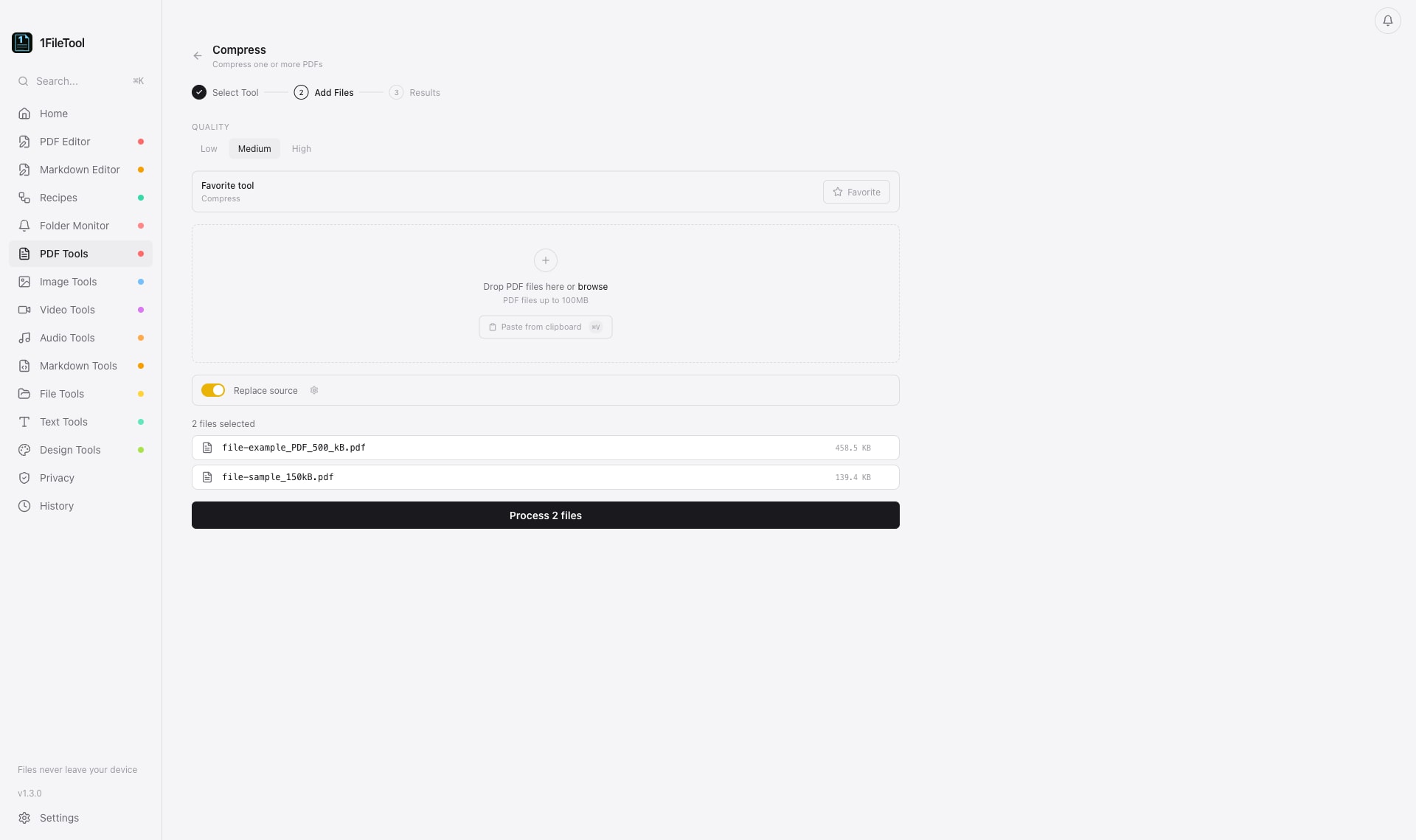 Batch file tools are most useful when the work stays local and the result can be checked before anything leaves the machine.
App sprawl is a symptom
Many file workflows break into a pile of single-purpose apps: one tool for compression, another for conversion, another for OCR, another for renaming, another for staging, and a web service when the local tool fails. That sprawl is not just annoying. It makes the workflow harder to repeat and harder to trust.
A better local file workbench does not need to hide every detail. It needs to make common jobs easy to run, keep files on disk, show what changed, and let the user chain small operations without turning the task into a SaaS account decision.
The StoicSoft angle
This row supports content around local file tools: practical utilities for files that are too private, too large, too repetitive, or too specific for generic web tools. The common thread is control. The user should be able to run the operation where the file lives, inspect the output, and keep the original workflow intact.
That matters for individuals with personal archives, freelancers preparing client files, teams cleaning documents, and anyone handling media that should not become someone else's upload queue. It also matters for repeatability. A task done once by hand becomes expensive when it has to be done every week across new folders.
What this row should turn into
The post-worthy idea is that serious file work often starts with boring operations. Convert this. Compress that. Rename the set. Extract the pages. Preserve the metadata. Keep the original. Those operations deserve local, reliable tools because they sit at the boundary between private material and finished work.
The best file utility is not the one with the loudest feature list. It is the one that lets the user finish the job without moving the file somewhere it did not need to go.
This is why local file tooling keeps resurfacing even as browser utilities multiply. The user does not only need a conversion result. They need confidence that the original stayed private, the output can be checked, and the same operation can be repeated without rebuilding the workflow from scratch each time.
Source signal: https://www.reddit.com/r/macapps/comments/1unaxwe/