One-click PDF prep packs: collapsing the freelance client deliverable workflow
Freelancers send PDFs to clients all day — invoices, contracts, scanned IDs, signed proofs — and the prep workflow looks the same every time: compress, redact, watermark, merge, sign. Today it's six tabs across three cloud tools. The win is a single local preset that runs the whole pack in one click, with the source files never leaving the desktop.
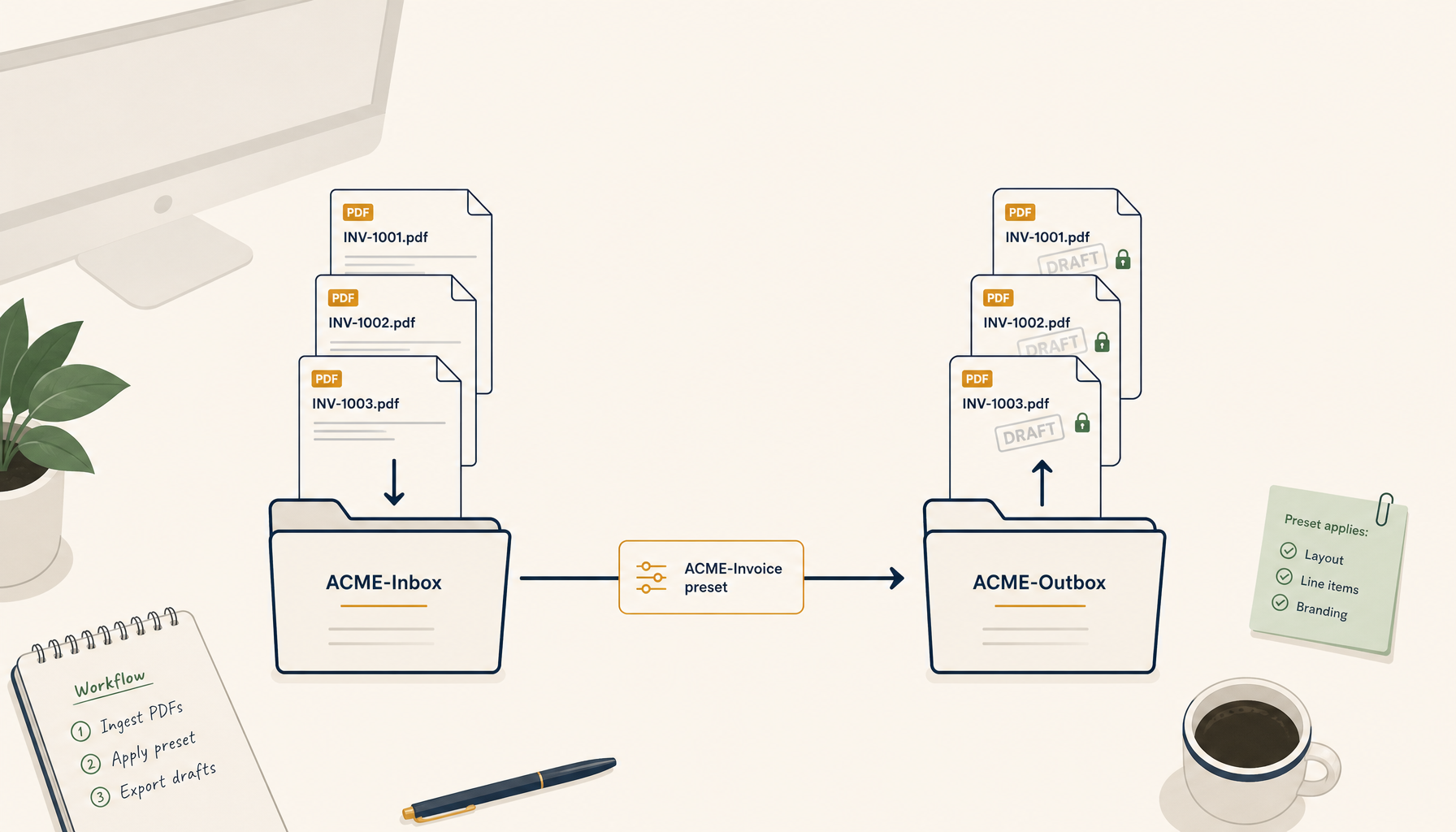
Watch a freelancer prep one client deliverable and you'll see the same six-step dance every time. Open the source PDF in Preview or Adobe. Compress it because the original is 38MB. Switch tabs to Smallpdf, redact the bank-account line. Switch to iLovePDF, watermark with a low-opacity "DRAFT" stamp. Back to the desktop, run a script to merge two attachments. Open DocuSign or the client's portal to sign. Rename. Email.
Do that fifteen times a week — invoices, contracts, scanned receipts, signed proofs, ID docs for KYC — and the per-deliverable workflow becomes its own job. The thing that finally collapses it isn't a better single tool. It's a one-click prep pack: a saved preset that runs the entire chain locally, against any file you drop into a watched folder, with the source bytes never leaving the desktop.
This isn't a marketing claim. It's the shape that keeps coming up on r/freelance, r/Lawyertalk, r/Accounting, and r/smallbusiness when someone asks "how do you actually deliver to a client without losing an hour?" The replies converge on three things: avoid cloud uploaders for anything with PII, batch as much as you can, and standardise the prep so you stop reinventing it per client. The prep pack is what that converges into when you build it.
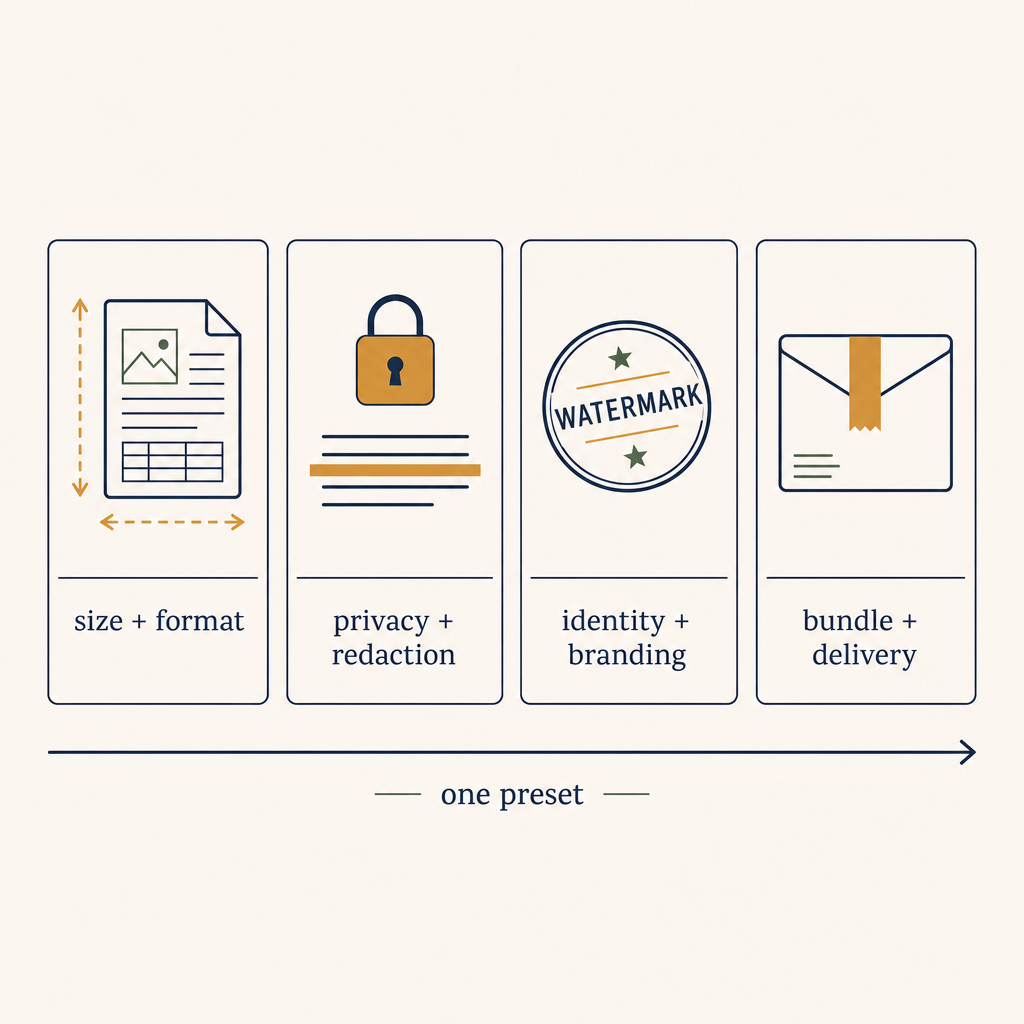
What's actually in a prep pack
Four categories of step show up in almost every freelancer's chain. A prep pack is just the saved combination of the ones you use on a given deliverable type.
- Size + format — compress to under a client's upload limit (10MB is the modal threshold), convert from
.docxor.pagesto PDF/A so it doesn't render differently on the client's machine. The compression step is where 80% of the time goes for designers and photographers; image-heavy PDFs balloon if you don't downsample. - Privacy + redaction — strip metadata (author name, software trail, last-edited timestamp), redact rows or zones containing PII, remove EXIF from any embedded images. For attorneys and accountants this is non-negotiable; for everyone else it's still good hygiene.
- Identity + branding — watermark with
DRAFTfor in-flight versions or with the client's name for delivered versions, drop a footer with your contact + invoice number, page-number the whole document. - Bundle + delivery — merge attachments, split into per-client packages, password-protect the final file with a client-specific code, rename to a consistent pattern (
2026-05-13_ACME_Invoice-0142.pdf).
A "prep pack" is just steps 1–4 chained, with the choices made once per client or deliverable type, then re-applied per file. The trick is that the chaining lives in a preset, not in your head.
Why cloud tools fail this shape
Smallpdf, iLovePDF, and the rest are excellent single-step tools. They lose this workflow on three fronts:
Each step is a separate tab and a separate upload. Compressing a 38MB PDF takes seven seconds. Uploading it three times, to three different tools, takes forty. Even if every cloud tool were free and fast, the round-trip dominates the wall-clock time.
The source file leaves your machine. Smallpdf's terms list a 14-day retention window. iLovePDF describes "automated cleanup" without a hard SLA. For a designer's draft this is fine. For a contract draft with a counterparty's PII, it's the line that gets you a sternly worded email from your client's legal team. The freelance threads that escalate from "my workflow is slow" to "I'm switching tools" almost always pivot on a specific compliance ask.
There's no preset memory across tools. Even if your compress step is cloud and your redact step is cloud, you can't say "do this every time for ACME deliverables." You re-pick settings every time. The cognitive load of picking settings is what makes the freelancer give up and email the un-prepped file at 11pm.
None of these are fixable inside any single cloud tool. They're fixable by moving the workflow off the cloud entirely.
The local one-click design
A local prep pack has three pieces.
The preset
A saved configuration of the four step categories — sizes, redaction regions, watermark template, merge order. You build it once per client or per deliverable type (ACME-Invoice, Tax-Return-Client-Copy, Photo-Delivery-Watermarked), and from then on it's a single dropdown choice.
Good presets carry three properties: they're named for the use case (not the steps), they're exportable so a small team can share them, and they're parameterised on the minimum number of inputs — usually just a client code and a date.
The watched folder
A directory the tool monitors. Drop a file in ~/Deliverables/ACME-Inbox/ and the prep pack runs against it automatically, writing the prepped output to ~/Deliverables/ACME-Outbox/. No clicking, no menus, no "which tool was that step in."
The watched folder is what turns a one-deliverable workflow into a hundred-deliverable workflow without any per-file effort. It's also what makes the design durable: when a junior on your team needs to do the same prep, they don't need to learn your tool stack, they just need the right inbox folder.
The local pipeline
The tool that actually executes the chain. On macOS, AppleScript + Automator can do a thin version of this for simple steps. For anything that includes redaction, watermarking, or merging, you want a real desktop app — 1FileTool's Tool Presets + Folder Monitor combo is one purpose-built option; if you're rolling your own, the floor is pdftk + gs + qpdf wired into a shell script with fswatch.
The substance is the same: a deterministic local pipeline, runnable in one click or zero, configurable per use case, and incapable of leaking source bytes to a third party.
What you save
Freelancers who switch from a cloud-tool stack to a local prep-pack workflow report two consistent numbers when they post the migration: a per-deliverable time saving of around 60–80%, and a reduction in "PII-anxiety" client questions to roughly zero. The time number is partly the upload round-trip and partly the elimination of decisions ("what compression level did I pick last time?"). The anxiety number is the bigger one for regulated work — when your contract says "files are processed locally and never transmitted to third parties," you can put that in the SOW and the conversation ends.
There's also a quieter saving that doesn't get written about: the cancellation of three or four subscriptions. The freelancer who was paying $9/mo Smallpdf + $9/mo iLovePDF + $14/mo PDF Expert + $7/mo a watermarking tool walks away from ~$40/mo recurring, replaced by a one-time desktop app cost. Over a year that's most of a new monitor.
When the prep-pack pattern doesn't fit
Three cases where it isn't the move:
- One-off delivery. If you send a PDF to a client twice a year, the prep pack is over-engineered. Use whatever's open.
- Collaborative editing on the prep itself. If two people on your team need to mark up the same draft before delivery, a prep pack runs after the editing is locked. Keep your collaboration tool of choice for the editing phase.
- Client-mandated cloud workflows. Some enterprise clients require uploads through their portal with auto-virus-scan. The prep pack runs locally; the portal handles the final hand-off.
In all three, the prep pack is still the part of the workflow worth standardising — you just stop short of the bundle/delivery step and let the human or the portal close it out.
How to set yours up this week
The minimum viable build:
- List your three most common deliverable types from the last 30 days. Name each one.
- For each, write down the four-category chain you actually do. Where are the steps? Where are the settings?
- Pick the tool — desktop app with presets + folder monitor (1FileTool is one option; PDF Expert + Hazel is another; a hand-rolled
pdftk+qpdfpipeline is a third). - Build the preset for the most-frequent deliverable type. Run it against ten real files from your archive. Tune until the output is the same as your hand-built version.
- Set up the watched folder. Forward your invoice-generator (or scanner, or design export) to drop into the inbox.
- Stop using the cloud tools for these files.
Four hours of setup, recovered in the first week. The reason it's worth doing now is the same reason teams set up Makefiles: the workflow you run repeatedly should not be the workflow you re-decide repeatedly. A prep pack is the freelancer's Makefile for deliverables.