Context Reset Patterns for Long AI Coding Sessions
Long AI sessions drift. The fix isn't a bigger context window — it's three explicit reset patterns and a habit of curation.
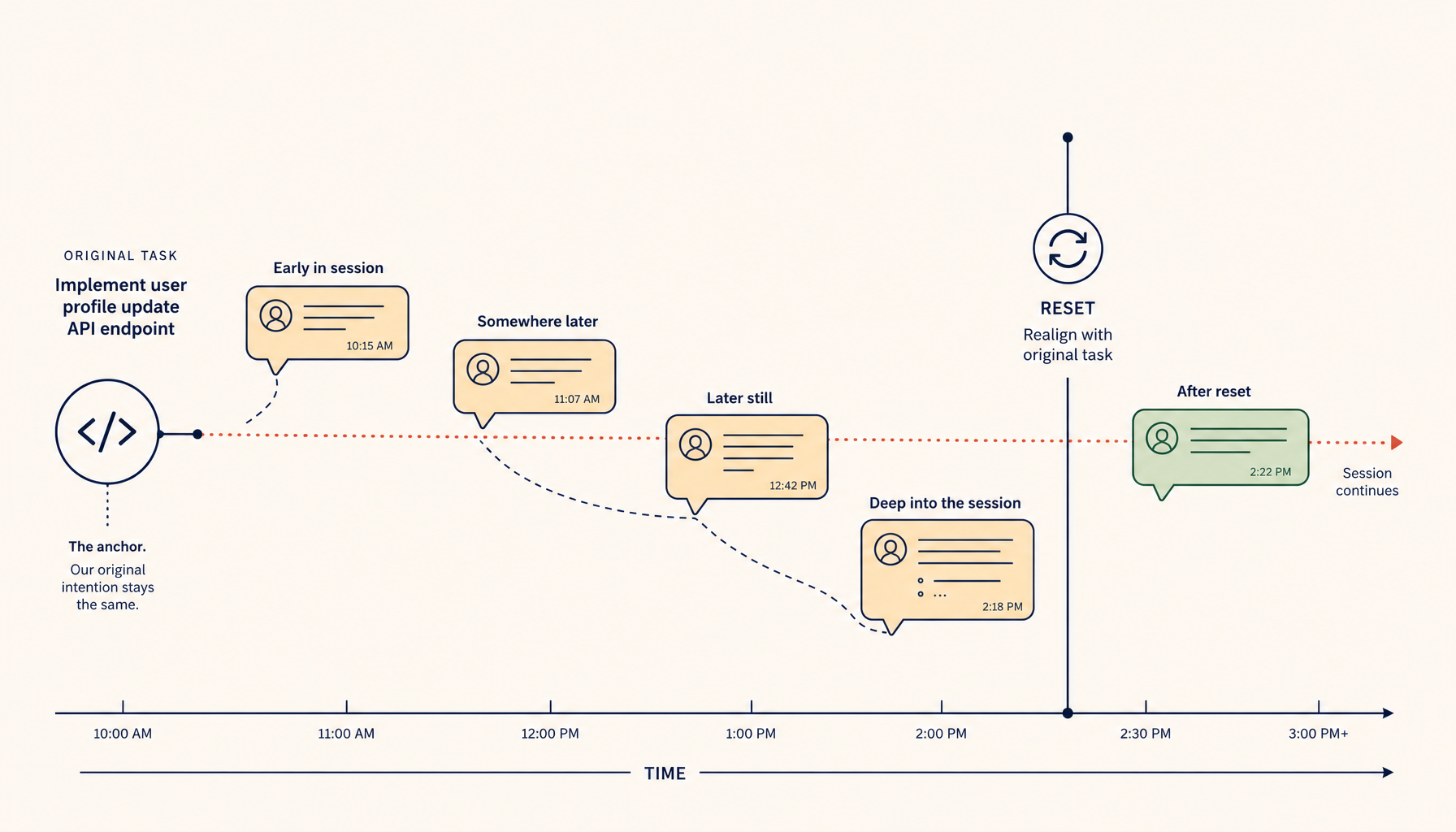
Long AI coding sessions drift. After an hour of back-and-forth, you ask a simple question and the assistant answers based on a tangent from forty messages ago. The output is technically responsive but practically wrong — it's anchored on stale context.
The fix isn't a longer context window. It's an explicit reset.
What context drift actually looks like
Three patterns:
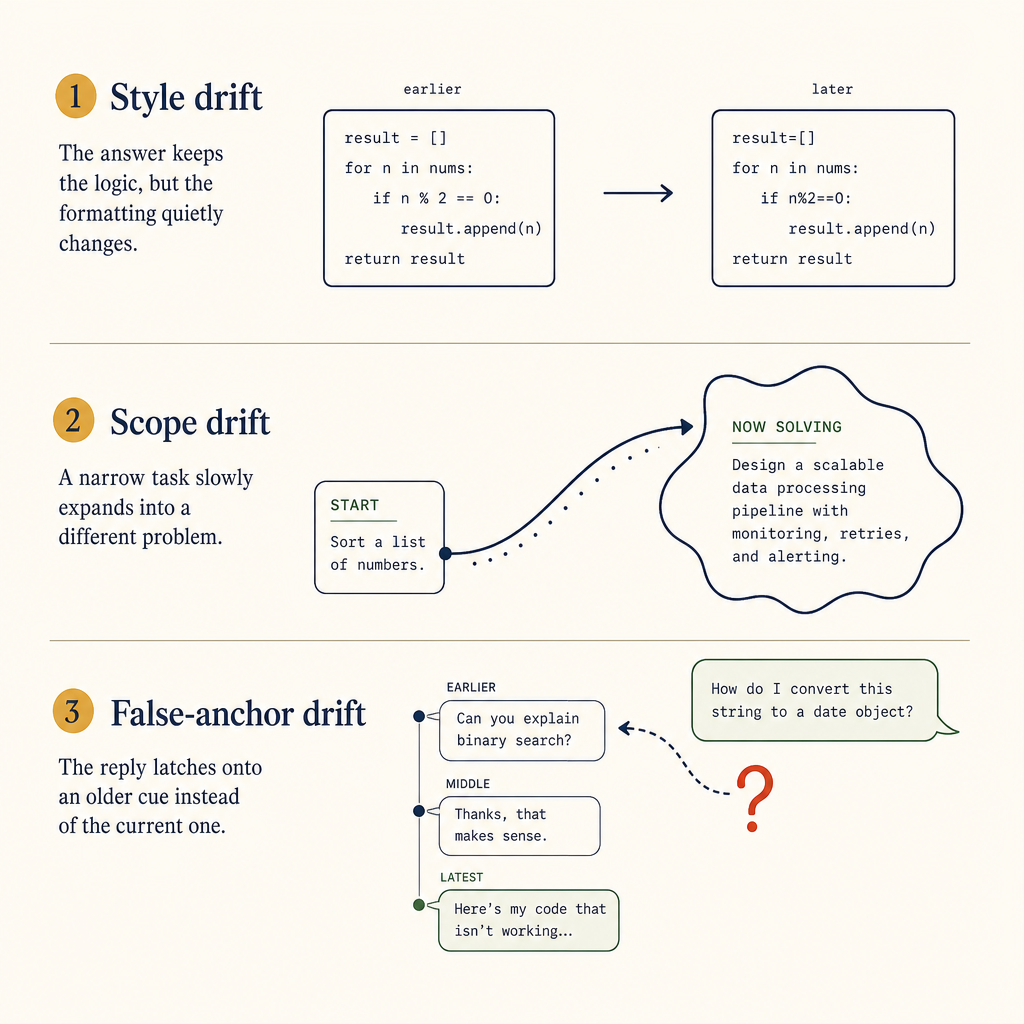
Three drift modes that all look fine inside one turn, then compound across forty.
- Style drift. Early in the session you said "use snake_case." Twenty messages later the assistant is producing camelCase because it picked up your latest paste, which was JavaScript.
- Goal drift. You started by debugging an auth bug. After fixing it you asked an unrelated database question, but the assistant's reply still includes auth-related caveats.
- Anchoring drift. You shared a code snippet at the start. The assistant keeps generating against that file even after you've moved on, so it suggests methods that don't exist on your current file.
All three feel like the assistant "forgot" something, but they're really the opposite — the assistant remembered too much, including things that were superseded.
The reset patterns
Three reset patterns work, ordered from cheapest to nuclear.
1. Inline re-anchor
Mid-conversation, paste:
Forget my earlier file
auth.ts— I'm now working ondb.ts. Use the file below as the new ground truth.
Then paste the new file. This is a partial reset — keeps the high-level conversation but tells the model what's authoritative now.
Effective for goal-shift moments. Cheap. Recovers most cases of anchoring drift.
2. Hard reset within the same session
Open a new chat with the same context (project, language, previous decisions) but no message history. Some tools (Cursor, Claude Code, the new Composer 2) call this "branching" or "new chat from the current context."
Use this when:
- You've made a major architectural decision and earlier discussion is now misleading.
- The conversation has wandered through 3+ unrelated topics and you can't remember what's still active.
- You're about to ask a question whose answer depends only on the current code, not the conversation.
This loses the message history but keeps your project context. It costs about 30 seconds and saves you from 5+ messages of "no, ignore that earlier thing."
3. Session retire
Close the chat entirely, write a 2-line note in your task tracker about what you decided, and start fresh tomorrow.
This is the right move when:
- The conversation has produced both a working solution and a dozen abandoned approaches that the assistant keeps suggesting.
- You need to step away and come back with fresh eyes.
- The signal-to-noise of the chat has dropped below "easier to start over than to read."
The 2-line note is the key — without it, you forget the decisions and re-litigate them tomorrow. With it, the next session can start from "we already decided to use X" and not "what should we use?"
How to make this discoverable in your tool
If you build or configure AI coding tools, the reset is usually invisible. Make it visible:
- A prominent "Reset context" button in the chat header, not buried in a menu.
- Optional reset reasons for analytics: "anchored on wrong file", "scope changed", "history is noisy."
- A "branch with current context" action separate from "new chat" — most users don't realise these are different.
The Cursor team got this partially right with branching. Claude Code's /clear is fast but throws away too much. The pattern that works best in practice is: keep the project files visible, drop the message history, and add one fresh starting message that summarises the goal in 2 sentences.
The summarise-then-reset pattern
For long sessions where you genuinely need continuity:
- At the end of a productive thread, ask the assistant:
Summarise what we decided and what's still open in 5 bullets. Format for pasting into a future conversation.
- Save those 5 bullets in your task tracker (or paste into your tool's "project notes" /
CLAUDE.md). - Start a fresh chat. Paste the summary as your first message. Continue from there.
This converts conversation history (high noise) into a compressed decision log (low noise). The next session reads the summary in 30 seconds instead of scrolling through 50 messages.
Why "more context" is the wrong fix
Tool vendors keep advertising bigger context windows as the answer to drift. They aren't.
Drift isn't caused by insufficient memory. It's caused by stale memory that's no longer relevant. A 200K-token window with 180K tokens of obsolete context is more drifty than a 50K-token window with 5K tokens of current context.
The right axis is curation, not capacity. Make it cheap and obvious to drop the parts of the conversation that are no longer load-bearing.
A 30-second discipline
Start adopting this as a habit:
- Before asking a major question in a long session, scroll up and read your messages from the last 20 minutes. If you can't recall why most of those messages exist, hard-reset.
- After the assistant produces something useful, immediately ask it to summarise just that finding in one paragraph. Save that paragraph somewhere durable.
- Once a day, archive your AI session history. Long sessions accumulate cruft.
Context drift is a symptom of treating the chat window as your canonical record. It isn't. Your code, your task tracker, and your decision log are. The chat is a tool for getting from one durable artifact to the next — and resetting it cheaply is part of using it well.
Related in the StoicSoft network
If you work in AI-assisted coding, shared terminal sessions, or agent-driven shell workflows like the ones above, 1devtool is the StoicSoft network's tool for safer AI-assisted terminal work — shared sessions with auditing, preflight policy, and tiered model routing built in.