Planner/Executor Patterns for Composer 2 (and Any Agent-Style AI Coder)
Agent-style coding tools burn tokens fast. Scope, plan, cap, and verify — the four-step pattern that keeps quality high and cost contained.
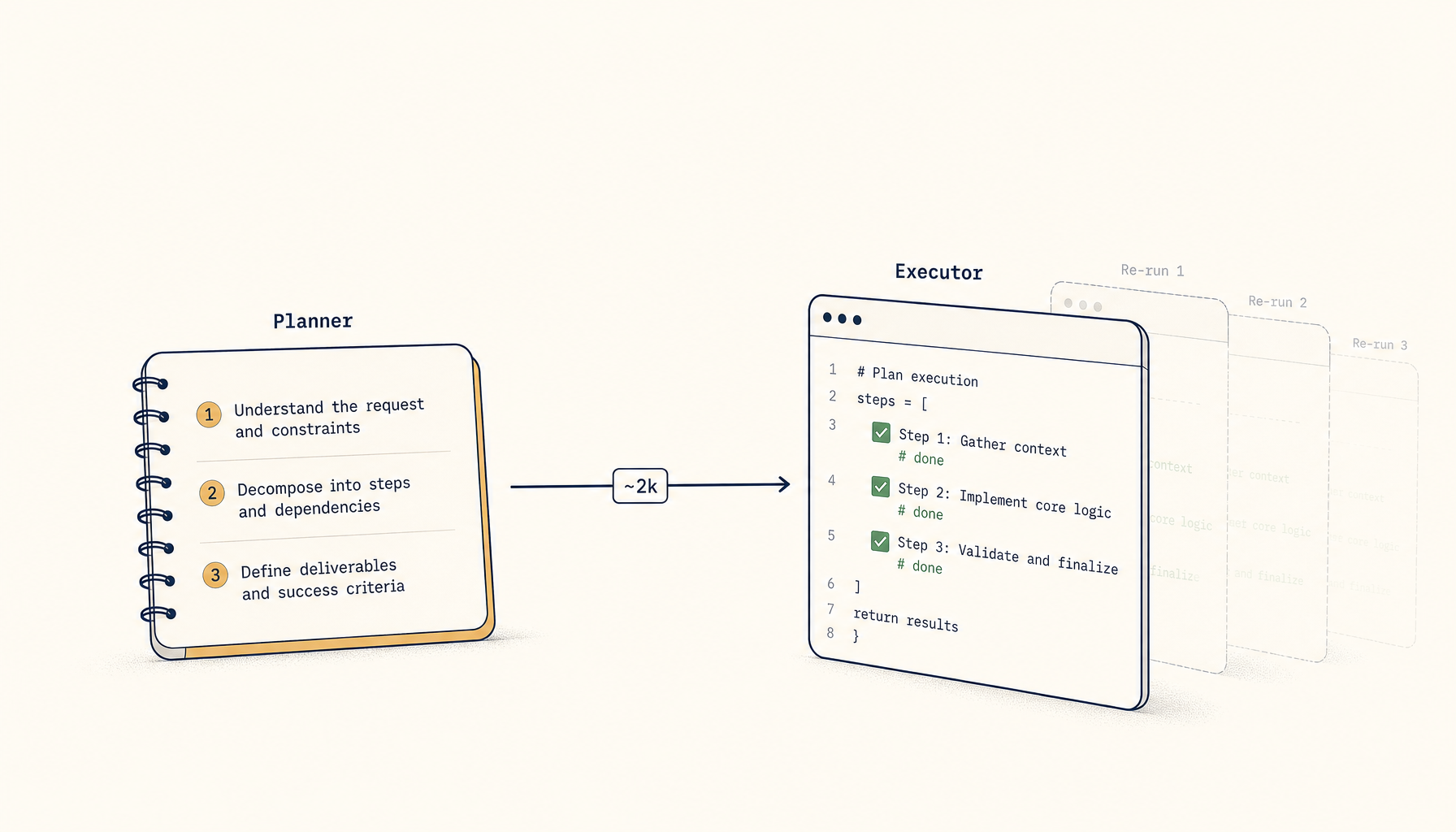
Cursor's Composer 2 (and the broader pattern of AI agents that plan-then-execute multi-step coding tasks) burns tokens faster than chat-style assistants because it's effectively running multiple inference passes per user turn: one to plan, several to execute, often more to self-correct.
Done well, that's worth it — you get more done in fewer human prompts. Done badly, you spend $5 to get a 3-line code change.
Here's the planner/executor pattern that keeps quality high and token burn manageable.
The two failure modes
Mode 1: under-scoped runs
You ask: "fix the auth bug." The agent runs for 90 seconds, makes 12 file edits, refactors something unrelated, breaks two tests, and produces a sprawling diff you have to undo.
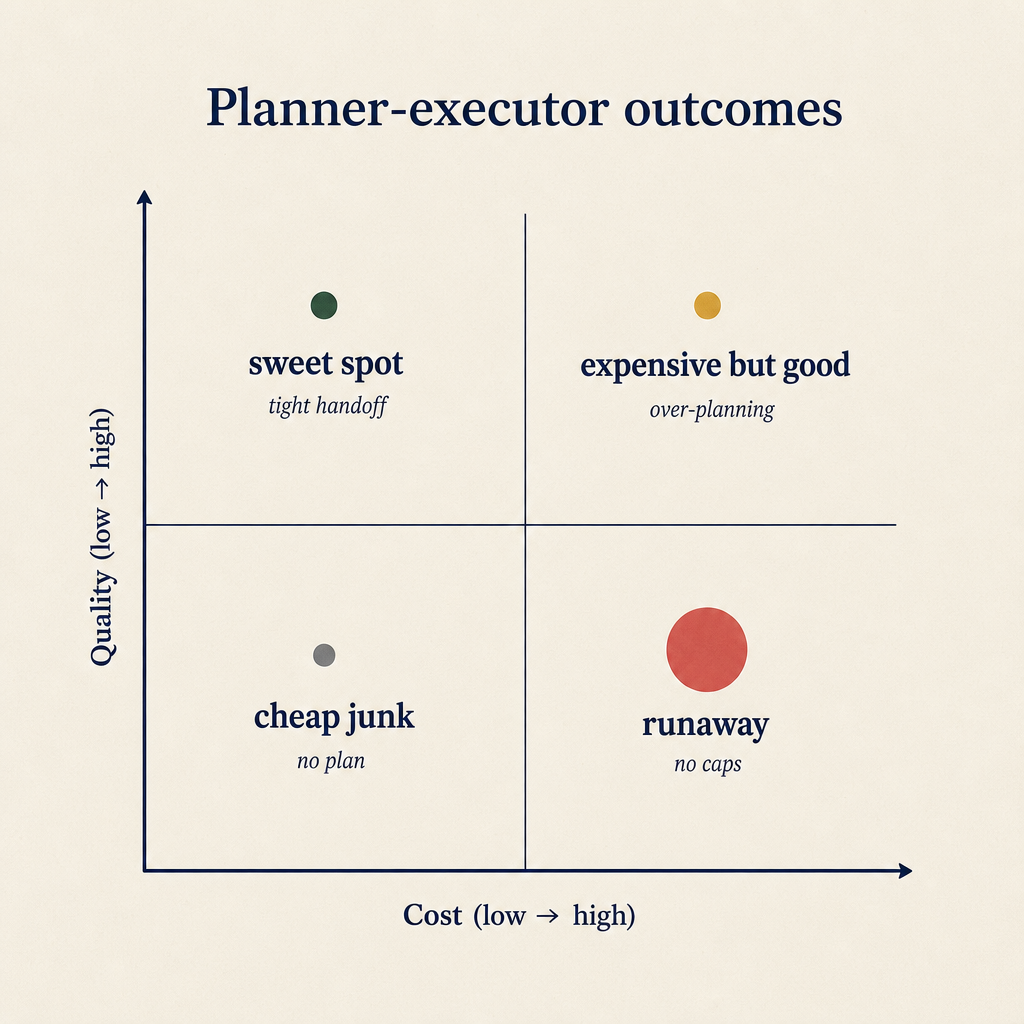
Most failure modes live in the bottom-right: high cost, mediocre output. The fix is rarely 'use a better model' — it's tightening the handoff.
Root cause: vague scope. The agent fills the gap with its own assumptions, most of which are wrong.
Mode 2: over-budgeted runs
You ask the agent to "review this 200-line file for issues and refactor." It does, then it decides the imports could be reorganised, then it notices the helper function should be moved, then it spots a typo in the README… 4 minutes later it returns 600 lines of changes spanning 9 files.
Root cause: no upper bound. The agent treats "look at this file" as license to do everything tangentially related.
Both modes burn tokens for results you can't ship.
The repeatable pattern
Step 1: Always scope the run before kicking it off
Three sentences, max. Format:
Goal: {what you want changed} Files in scope: {explicit list, max 3-5} Out of scope: {explicit list of things to not touch}
Example:
Goal: fix the bug where
/loginreturns 500 when password is missing. Files in scope:src/api/auth.ts,src/api/auth.test.ts. Out of scope: any other files; no new dependencies; no schema changes.
This is 25 tokens. It saves you from a 5,000-token over-broad run.
Step 2: Force a plan before code
Add to your prompt:
Before writing code, output a numbered plan in 5 lines or fewer. Wait for me to approve it.
Most planner/executor tools will respect this. The plan is cheap (1K tokens) and gives you a chance to redirect before the expensive execution phase starts.
When the plan looks wrong, you fix it in plain English. When it looks right, you say "go." The model now has explicit alignment instead of inferring intent.
Step 3: Cap the executor
Tell the agent up front:
Maximum 3 file edits. If you can't complete the task in 3 edits, stop and explain why.
This is a soft cap — the agent will sometimes exceed it for legitimate reasons (e.g. a tightly coupled refactor that genuinely needs 5 files). But it forces the agent to consciously decide rather than incrementally drift.
For Composer 2 specifically, you can also constrain via the "edit only files in the chat" toggle. Use it.
Step 4: Make verification cheap
After the executor returns, a typical follow-up is "does it work?" Don't ask the model to run tests in prose — give it a tight tool call:
Run only the tests in
auth.test.tsand report any failures.
Specifying which tests bounds the run. Otherwise the agent will run the full suite, which on a real codebase is 30-180 seconds and 5K-50K tokens of output it has to digest.
A worked example
Bad prompt:
"There's a bug in the login flow, can you fix it?"
What happens: 7 file reads, 4 file edits, 2 test runs, ~12K tokens, 90 seconds, 60% chance the change is correct.
Good prompt (planner/executor variant):
Goal: fix the 500 in /login when password is missing. Should return 400 with
{error: "password_required"}. Files in scope:src/api/auth.ts,src/api/auth.test.ts. Out of scope: any other files, no new tests except the regression for this bug, no logger changes.Output a numbered plan in 5 lines or fewer. Wait for approval.
What happens: 800-token plan response. You approve in 5 seconds. Executor runs constrained, makes 2 file edits, ~3K tokens, 25 seconds, 90% chance the change is correct.
Same outcome. 1/4 the cost.
The token-burn audit
If your team runs an agent-style coding tool, do this once a week:
- Pull the last 20 agent runs. Most tools have a session log.
- Bucket by token consumption. The top 20% by token use almost always correlate with vague prompts or no scope.
- Look at the prompts that produced those expensive runs. They almost always lack a Files in scope / Out of scope clause.
- Use the buckets as training material. Show the team the 5 most expensive prompts and their refactored "good" versions.
Within two weeks of doing this, your average cost-per-task drops measurably without any tooling change.
When the long form is right
Planner/executor with strict scope is the default. Two situations where you intentionally relax it:
- Exploratory tasks. "Look at this code and tell me what stands out." The whole point is breadth. Don't constrain to 3 files; just expect a higher cost.
- Refactor tasks where the scope IS the discovery. "Find every place we instantiate the old pattern and migrate them." Here the agent's job is to traverse the codebase. Strict scope defeats the purpose.
In both cases, set a session-level token budget instead of a file-count cap. "Spend up to 20K tokens on this, then stop and summarise."
Closing principle
The best planner/executor results come from explicit constraints, not better prompts. Scope, plan, cap, verify cheaply. Each step is short. Each step bounds the next. The agent does the work; you do the bounding.
Tools like Composer 2 are a multiplier — but on what you give them. Vague prompts × multiplier = expensive nonsense. Tight prompts × multiplier = actual leverage.
Related in the StoicSoft network
If you work in AI-assisted coding, shared terminal sessions, or agent-driven shell workflows like the ones above, 1devtool is the StoicSoft network's tool for safer AI-assisted terminal work — shared sessions with auditing, preflight policy, and tiered model routing built in.
From across the StoicSoft network
Hand-curated reads on the same topic from sister sites in the StoicSoft family.
- 1FileTool5 min read
Watch Any Folder. Process Files as They Arrive.
The Folder Monitor watches any folder and automatically applies a tool to every new file — compress, convert, strip metadata — in the background, without you having to touch the tool each time.
Read on 1filetool.com  1FileTool5 min read
Edit PDFs Visually and Save Your Tool Settings as Presets
1FileTool now has a visual PDF editor — see pages as you rearrange, annotate, and watermark. Plus tool presets: save your settings once and apply them in one click, across every tool.
Read on 1filetool.com