Search-scope is the first knob: stop your AI agent from grepping the whole repo
Token blowups in Claude Code, Cursor, and Codex are usually a tool-call-scope problem, not a model problem. Four tactics to make the agent's search return 4 files instead of 47.
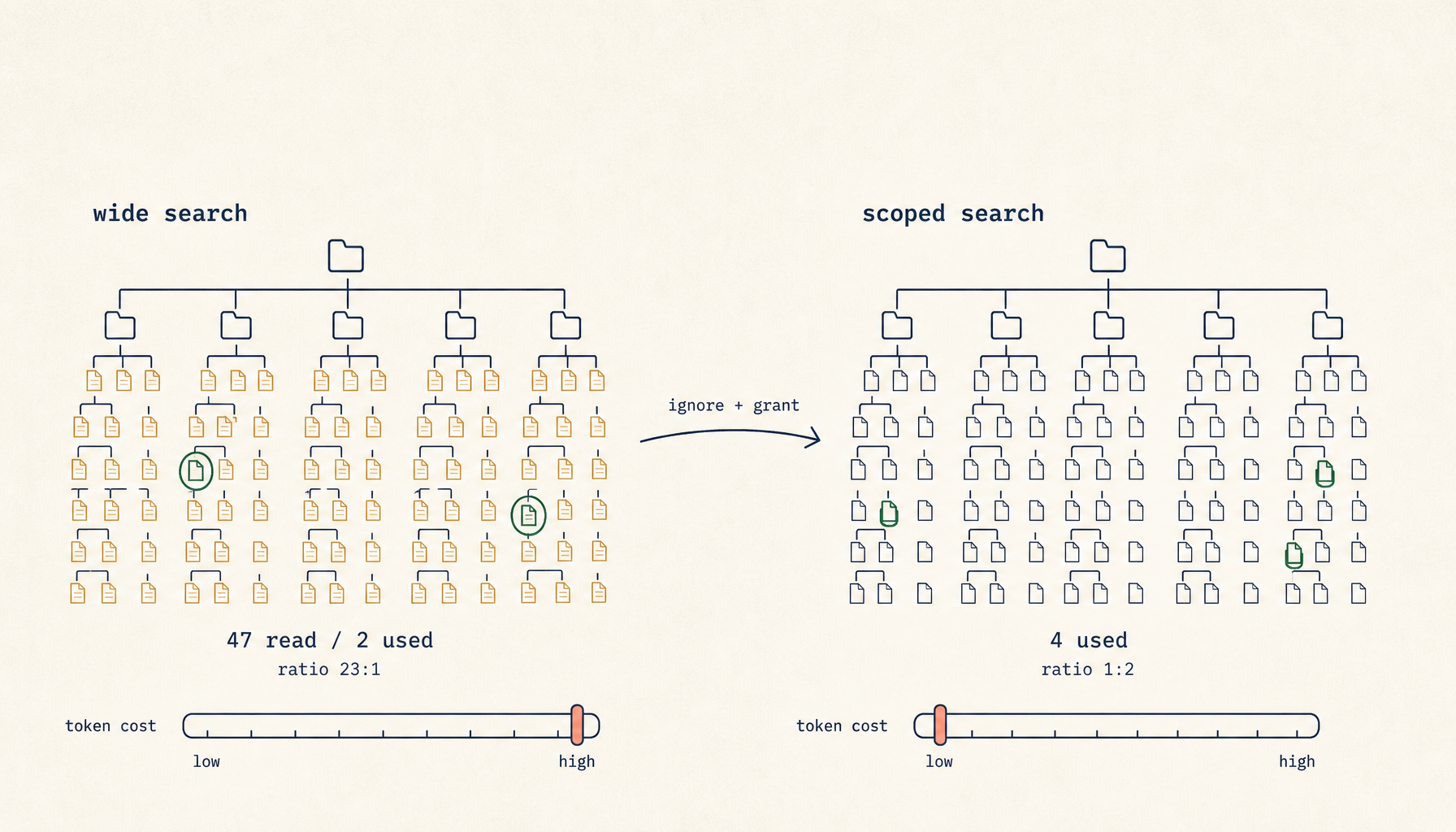
A developer asks the agent a routine question: "Where do we handle 401s?" Ninety seconds later the agent comes back with an answer. Confidently wrong. The middleware it cites was deprecated eight months ago and lives under legacy/auth/. The current handler — three lines, one file, exactly the answer that was asked for — is src/middleware/auth.ts. To produce that wrong answer, the agent read 47 files and burned 80,000 input tokens.
The model is not the failure. The model did exactly what it was told: predict from what was in front of it. What failed is the tool call that put 47 files in front of it when 2 would have done. This is upstream of every context-window technique you already know. Before you can budget a context, you have to control what gets pulled into it. That control point is the agent's search tool.
Treat search-scope as the first knob, not the last.
What an over-broad search actually looks like
Open the trace on a session like the one above. The agent issues Grep "401|unauthorized" against the repo root. The tool returns 38 hits across legacy/, archived/, tests/, node_modules/typed-emitter/.../auth.d.ts, three vendored copies of an SDK, and a .next/ cache that should not exist on disk. The agent ranks the hits — the ranking is approximate, based on filename heuristics and snippet relevance — and reads the top 12. Two of those twelve are the current middleware. Ten are noise: old tests, dead code, type stubs, archived experiments.
The model now writes its answer from the most-recent file it loaded into attention. That file is whichever one was at the bottom of its read sequence, which on a long context is the file the model weighs most heavily. There is no consistent rule about which file ends up there. Often it is the deprecated one, because deprecated code tends to be more verbose and matches more search terms. The wider the search, the more the answer is determined by the order of reads rather than by the relevance of the code.
This is the failure shape. It is not a hallucination. It is a faithful reading of irrelevant evidence.
Why this is upstream of context-budgeting
Plenty of good writing already exists on managing the context window: chunking, plan/execute splits, handoff summaries, hard resets. All of it helps after the evidence is in the window. None of it helps decide what evidence enters the window in the first place.
If the agent's search had returned 4 files instead of 38, you would already be inside budget without any chunking discipline. The plan-execute split would not be carrying load. You would not be writing handoff documents because the session would not have saturated. Most context-management techniques are backstops for the case where search-scope failed. Fix search-scope first and the backstops mostly stop firing.
Frame it the same way you frame test costs: every search is a query against your token budget. A wide query is a slow, expensive query that returns dirty results. A narrow query is fast, cheap, and clean. The discipline is the same discipline you would apply to a database that bills per row scanned.
Tactic 1: a real .cursorignore / .claudeignore / .aiignore
Most modern coding agents respect a top-level ignore file with .gitignore syntax. Cursor uses .cursorignore. Claude Code respects .claudeignore and falls back to .gitignore. Codex and several others read .aiignore. The leverage on this single file is enormous and most teams skip it.
A real one looks like this:
# Generated and vendored
node_modules/
dist/
build/
.next/
.turbo/
**/__generated__/**
**/*.generated.{ts,js}
vendor/
third_party/

# Archived and superseded
legacy/
archived/
deprecated/
**/old/

# Heavy fixtures
tests/fixtures/large/
**/*.snap
**/*.min.js
**/*.map

# Lockfiles - never load-bearing in a question
package-lock.json
pnpm-lock.yaml
yarn.lock
Three observations from teams that have applied this. First, the legacy/ and archived/ blocks alone tend to halve token spend, because that is where most of the wrong-but-search-matching code lives. Second, __generated__ and .generated.ts exclusions are non-obvious wins — generated code matches every search term you can think of and never contains the answer. Third, lockfiles are the single highest token-per-irrelevance ratio in the repo. There is no good reason for an agent to read a lockfile to answer a code question, and yet by default they do.
Commit the ignore file. Treat it as load-bearing infrastructure.
Tactic 2: hand the agent a file list
When you already know which files matter, do not ask the agent to find them. Tell it.
Read src/middleware/auth.ts and src/routes/api.ts and answer:
where do we handle 401s, and what does the current flow look like?
If you need a file outside this list, stop and ask. Do not search.
That second sentence does most of the work. Without it, the agent will read your two files, decide it needs "a bit more context," and grep the repo anyway. With it, the agent treats searching as a permission boundary and asks before crossing it. Modern coding agents respect this when it is stated as a hard constraint, in the same way they respect "do not edit files outside your scope."
This pattern is not a fallback. It is the default for any task where you, the human, already know the relevant files. Which is most tasks. The agent's search exists for the cases where you do not.
Tactic 3: scope the tool grants
Claude Code, Cursor, and Codex all support per-tool grants. The defaults are permissive — the agent can grep anywhere, glob anything, read any file the OS will let it read. The defaults are wrong for most production work.
A scoped Claude Code permissions block looks like this:
{
  "permissions": {
    "allow": [
      "Read(src/**)",
      "Read(tests/**)",
      "Edit(src/**)",
      "Bash(grep:src/**)",
      "Bash(grep:tests/**)",
      "Bash(rg:src/**)",
      "Bash(rg:tests/**)"
    ],
    "deny": [
      "Read(legacy/**)",
      "Read(archived/**)",
      "Read(node_modules/**)",
      "Bash(grep:.)",
      "Bash(rg:.)"
    ]
  }
}
The deny rules are the load-bearing half. Bash(grep:.) blocks unscoped repo-wide greps without blocking scoped ones. Read(node_modules/**) blocks the agent from following an import statement into a transitive dependency it does not need. On tasks where Glob is unnecessary — which is most tasks where the file list is known — strip Glob from the allow list entirely. The agent will work around the missing tool, usually by asking, which is exactly the behaviour you want.
Tool grants are the only mechanism on this list that survives a forgetful agent. An ignore file can be missed; a prompt can be ignored under pressure; a tool grant simply does not fire if it is not in the allow list.
Tactic 4: search-only sub-agents
Sometimes a search is genuinely needed. The repo is unfamiliar, the question is open, the relevant files are not known. In that case, do not search inside the main session. Spin a child agent with a single task: search the repo for X, return only the file paths that match, no contents. The parent session reads that short list and decides which files to load.
The structure looks like this:
parent: I need to find where rate limiting is configured.
parent → child: "Search the repo for files that configure or apply
  rate limiting. Return ONLY a list of paths and one-line reasons.
  Do not return file contents. Do not read more than necessary."
child returns: ["src/middleware/rate-limit.ts — defines the limiter",
                "src/server.ts — wires it into the request pipeline"]
parent reads the two named files, answers the question.
The parent session never sees the 38 grep hits. It never loads the noise. It receives a 200-token answer to a question that, run in-line, would have cost 80,000 input tokens. The cost of "wide search" collapses to a single short message because the wide reading is sandboxed in a child whose context dies when it returns.
This is the pattern to reach for when the previous three tactics do not apply. It is also the pattern most teams skip, because it requires an extra step. The token math says it is worth the step.
The cost shape
The math is unforgiving. Fifty files at an average of two thousand tokens each is one hundred thousand input tokens per query. At Sonnet input pricing that is roughly thirty cents per query. Five such queries an hour is one dollar fifty per hour per developer, or about thirty dollars a day. The same answer with two files is twelve-tenths of a cent. The win is two orders of magnitude on cost, and a smaller but still real win on latency, and a much larger win on answer quality.
These numbers are not edge cases. Sessions that read fifty files in a single query are routine in default-configured agents. The cost is paid silently, distributed across many small reads, and only becomes visible when someone audits the bill at the end of the month.
A diagnostic loop you can run today
When you see slow plus expensive plus wrong, look at the tool call trace. Count two numbers. The first is how many distinct files the agent read during the query. The second is how many of those files appear, by name, in the agent's final answer. Call that ratio the read-to-cite ratio.
A ratio at or below 2:1 is healthy — the agent read what it needed and a little adjacent context. A ratio above 5:1 means the search was too wide. A ratio above 10:1 means the search was wildly too wide and you should treat the answer as untrustworthy regardless of how confident it sounds. The ratio is a metric, not a vibe. You can check it in any session, on any model, and it correlates strongly with answer quality.
Most teams do not have this number because they do not look. Looking is free.
What about RAG?
Retrieval-augmented generation does not fix this. It moves the over-fetch into the embedding step, where it is harder to see. A poorly scoped index returns the same kind of irrelevant evidence that a poorly scoped grep does, dressed up as semantic similarity. The same scoping rules apply: ignore-globs at indexing time, per-task index slices, narrow tool grants over the retriever. If you would not let the agent grep node_modules/, do not let it embed node_modules/ either.
RAG is a tool, not a substitute for scope discipline. Teams that adopt RAG without fixing scope tend to end up with the same problem at higher latency, because vector search is slower than rg.
The deeper rule, which earns being said plainly: tokens spent on irrelevant files are not just expensive, they are misleading. The agent will pattern-match on whatever you put in front of it. Show it less, and the answer gets sharper.
Related in the StoicSoft network
If you work in AI-assisted coding, shared terminal sessions, or agent-driven shell workflows like the ones above, 1devtool is the StoicSoft network's tool for safer AI-assisted terminal work — shared sessions with auditing, preflight policy, and tiered model routing built in.